


+1 202 335 8465
Contact our sales team
Application as Service
Run any application as Windows service
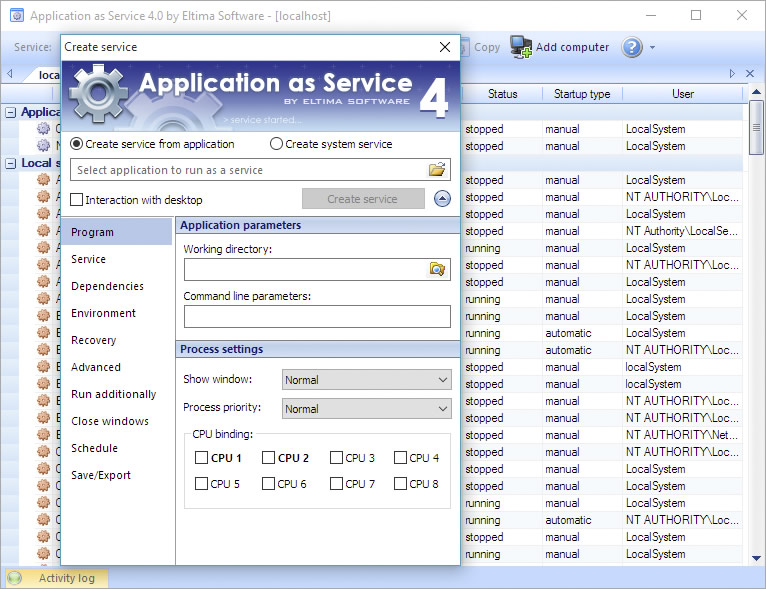
Application as Service is a cutting edge solution that will let you run any application as a Windows service, benefitting from all the advantages native Windows services have, still providing you with many more functions.
Application as Service offers advanced recovery options (restart the service your application is started by; restart computer; launch supplementary application), sophisticated dependencies mechanism, pre-service/post-service application start-up, your application rights/priority management, "application-crash" protection, graceful console application exit, on-the-fly start-up customization and lots more.
Application as Service offers advanced recovery options (restart the service your application is started by; restart computer; launch supplementary application), sophisticated dependencies mechanism, pre-service/post-service application start-up, your application rights/priority management, "application-crash" protection, graceful console application exit, on-the-fly start-up customization and lots more.
With Application as Service you can
-
Guarantee 100% uptime of your applications
Automatically restart your applications on power failures or application crashes. Ensure 100% uptime of your critical software, monitor the status of your applications and schedule their launching. Convert any program into service easily, without any coding skills required at all. -
Manage system services remotely
With Application as Service you can create and manage system services locally or on any remote computer (Application as Service is not required to be installed on a remote PC). You can run any application as service remotely in the other system and manage it easily. Multiple remote locations can be managed at the same time. -
Make your application start in any PC mode
Application as Service lets you run an application under a specified user account, launch programs before user logon (monitoring tools, surveillance utilities, etc), and even in front of the Windows Logon screen. The application can be started automatically or manually. -
Launch applications as services interactively or silently
You can run your application interactively (visible to users) or silently. Both, interactively and silently run services can be launched under user accounts. You can also choose user session (including RDP) in which interactive service should be started.
Corporate Solutions
Whether you're looking at redistributing our Application as Service technology as a part of your product or considering Application as Service software for an enterprise-wide deployment, we offer flexible and affordable corporate solutions designed to meet your needs.
OEM License
for Application as Service
Purchasing the OEM license you get:
• OEM license registration code which unlocks all OEM options• Detailed documentation about Application as Service OEM license usage and implementation
Why OEM?
• You will be able to embed Application as Service technology into your own software product.• OEM license grants you the right to redistribute Application as Service as a part of your software.
• OEM license is one-time royalty-free purchase.
How to evaluate the OEM license?
You can evaluate OEM license any moment - just download Application as Service and start using it.Please note that there are several OEM options which can be unlocked with OEM registration code only. Among these options:
• quiet registration from the command line;
• possibility to manage services remotely from your own app (create, edit, launch, stop, delete).
As for the rest, you will be able to fully evaluate all features OEM license offers.
Source Code License
Ordering Source Code license for Application as Service you receive all extensively commented programming source code (GUI sources are not included). In addition, we provide technical and information support by email, IMs and phone, and high-end consulting services absolutely for FREE. Our leading developers will help you implement Source codes and understand the advanced part of the product.
Site Licensing
If you know the certain number of computers to be equipped with Application as Service you may consider obtaining Limited Site License. The advantage of Site License comparing to multiple Single licenses is one license key for all company computers.
Full features list
| Run any application (32/64-bit and console ones) as Windows service | |
| Create and manage native system services in few clicks | |
| Easily connect to remote PC over local network or Internet and manage all remote services like your own (Application as Service is not required on a remote PC) | |
| Run application as service before users login into their accounts or after the network is fully initialized | |
| Run your application interactively (visible to users) or silently | |
| Choose user session (including RDP session) in which interactive service should be started - for Windows XP, 2000, 2003, Vista, 7 and Server 2008. | |
| Interactively and silently run services can be launched under user accounts. | |
| Schedule your service to run at the exact time and periodically on the defined day of the week/month/year | |
| Minimize downtime by auto-restarting application once it is crashed | |
| Advanced service dependencies mechanism allows you to run applications at the certain order |
What customers say
Next
-
- 4.9
We use Application as Service to run our email sending program. Your software makes it possible to logout from our dedicated server and take care of others aspects of our business, or use the server during night time. Renato Baccaro
based on 64 reviews
Let's get started
Application as Service for Windows
Demo version limitations
• 14-day trial period
System Requirements
Windows (32-bit and 64-bit): 2000/XP/2003/2008/Vista/7/8/10, Windows Server 2012
Latest Update
Version
4.0.160
(26 Apr, 2011) Release notes
Category
Utilities