


+1 202 335 8465
Contact our sales team
Virtual Serial Port Driver
Create pairs of virtual COM ports linked by virtual null-modem cable
Virtual COM Port Driver is a powerful technology designed specifically for those who develop, test, or debug serial port software and hardware. This solution will provide your system with as many virtual COM interfaces as you need.
If there are not enough physical COM ports or even if you don’t have a single real serial port on your computer, this dedicated software will come to the rescue. It will help you create pairs of virtual serial interfaces communicating via a virtual null-modem connection.
If there are not enough physical COM ports or even if you don’t have a single real serial port on your computer, this dedicated software will come to the rescue. It will help you create pairs of virtual serial interfaces communicating via a virtual null-modem connection.

Corporate offers & SDK
Whether you're looking at redistributing our Virtual Serial Port Driver solution as a part of your product or considering Virtual Serial Port Driver for an enterprise-wide deployment, we offer flexible and affordable corporate solutions designed to meet your needs.
PRO version of Virtual COM Port Driver
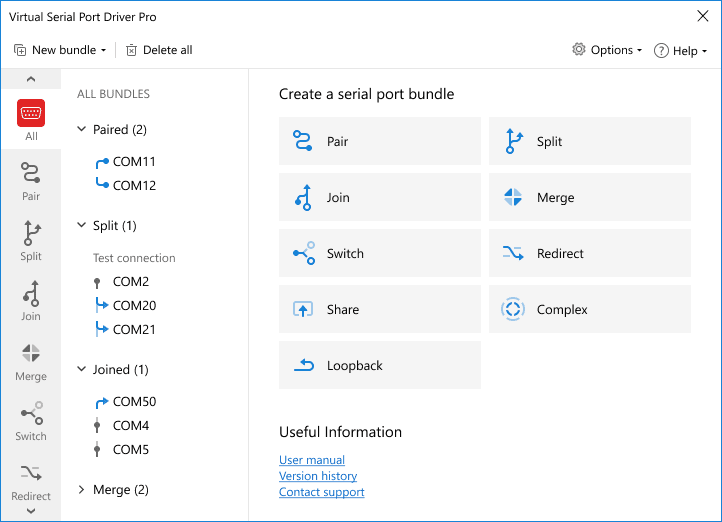
With Virtual COM Port Driver PRO, you unlock a host of outstanding additional features that let you split and join serial port data streams, add multiple COM ports to port bundles, merge ports for establishing connections “many-to-many”, create serial port switcher that will find a free COM port automatically, and many more.
-
Loopback port bundles
Using this new advanced feature, you can create a full-on loopback COM-ports and then add them to a bundle. This can be particularly useful when it comes to testing serial data transfer on a specific port. Thanks to the loopback, you won’t have to bother with factoring the band rate in your calculation (or any other line parameters whatsoever). Just send some data and right off see whether or not it can get through without any loss. -
Splitting COM port data
Any RS232, RS422, or RS485 port residing on your computer can be easily split into multiple virtual interfaces that will fully emulate its behavior and parameters. Once you enable this feature in Virtual Serial Port Driver PRO, all data coming to the split physical port will be forwarded to its virtual copies, each of them sending this data to a connected serial app. -
Joining serial ports
You can also link several hardware COM ports to one virtual. Serial data coming to these ports will be redirected to the virtual interface and joined into one data stream. If you connect your serial application to this virtual port, your program will be able to receive serial packets from multiple hardware COM ports at a time. -
Creating port bundles
When you create a complex bundle of serial ports with the software PRO version, you enable transmission of serial data in and out of any number of real or virtual serial interfaces. With this advanced feature, data received by one of the ‘In’ side ports can be redirected to all ports of the ‘OUT’ side and the other way around. -
Serial port merging
Virtual Serial Port Driver PRO enables you to merge any number of real and virtual ports so that your serial apps/devices can exchange data with multiple apps/devices simultaneously. To achieve this, you just need to create a bundle of COM ports without In and Out sides. In this kind of bundle, every added port can share its data with all the other ports at a time. -
Automatic port switcher
If you have several physical COM ports with identical devices attached to them, you can join these ports into one virtual interface. Then, you just open this virtual port with several serial apps. Now, any time one of the programs needs to communicate with one of the attached devices, the port switcher checks which device is currently free and connects it to the application automatically via the virtual interface.






Some of the features you get with the STANDARD edition of Virtual Serial Port Driver
Virtual Serial Port Driver is aimed at creating virtual COM port pairs that can be used instead of real COM ports for serial communication. This is especially convenient when all of your real serial ports are already occupied.
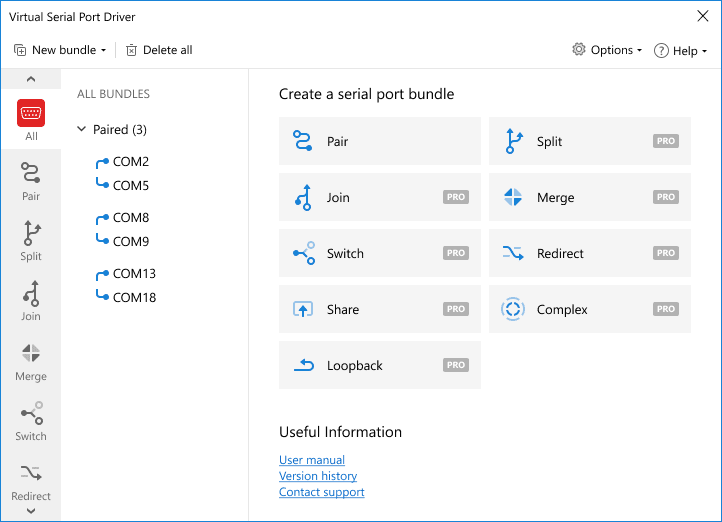
Create any number of virtual COM ports
All virtual COM interfaces you create with Virtual Serial Port Driver appear in the Device Manager of your system as though they were real RS232, RS422, or RS485 ports. Any device or application installed on your computer will recognize and communicate with a virtual COM port just as it would do with a physical serial interface.
Emulate real port settings
The software supports strict baud rate emulation, HandFlow control, and Windows kernel driver technology (WDM, WMI, Power Management, PnP, etc.) What’s more, with Virtual Serial Port Driver, you can emulate a serial line break and see full information about the current virtual serial port state, sent/received data, etc.
Manage hardware signal lines
Like in a real null-modem connection, virtual serial port communication supports all standard hardware signal lines (DTR/DSR/CTS/RTS/DCD/RI). Also, you can select loopback pinout or create a custom one depending on your hardware configuration.
How to create a virtual serial port
Virtual serial ports are essential when legacy software programs need to connect to COM port devices that cannot be connected to the computer with the software due to a lack of physical serial ports. The device can also send serial data to the app over the Internet or LAN over TCP/IP connection no matter how remote they are from each other.
Follow these simple 4 steps to create a virtual COM port:

1
Download and install Virtual Serial Port Driver on your PC.
2
Launch the program and open the "Pair", and click "Add a new pair".
3
Use predefined names from the drop-down menu or create custom names for your pair of virtual serial ports.
4
Click the "Create" button.
5
Need some visual help?
Watch video tutorials
Watch video tutorials
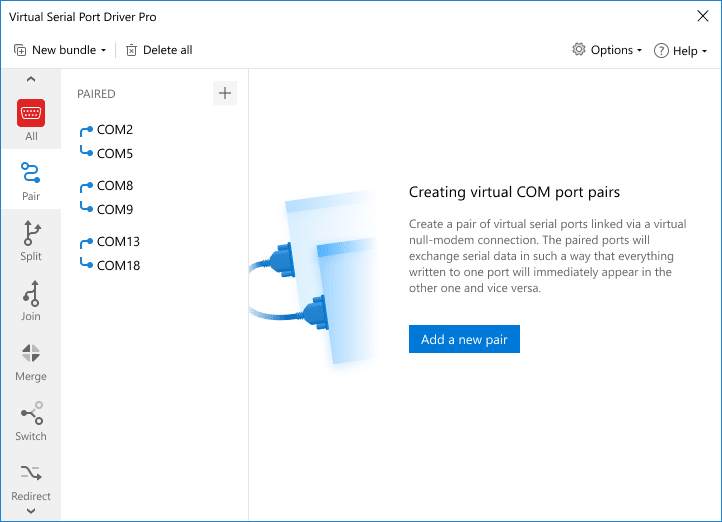
The new virtual COM ports should immediately be recognized and available through your computer’s Device Manager or Serial Ports Explorer.
Note: Virtual Serial Port Driver has no limit concerning the number of virtual serial ports that you can create.
Compare STANDARD and PRO versions
| # | Feature | Standard | Pro |
|---|---|---|---|
| 1 | Creating an unlimited number of virtual serial port pairs | ||
| 2 | Full emulation of real COM port settings and hardware control lines | ||
| 3 | Splitting one COM port (physical or virtual) into several virtual ones | ||
| 4 | Merging an unlimited number of physical or virtual serial ports into one virtual COM port | ||
| 5 | Creating complex port bundles | ||
| 6 | Ability to delete ports already opened by other applications | ||
| 7 | High speed of data transfer from/to a virtual serial port | ||
| 8 | Ability to forward serial traffic from one real port to another real or virtual RS232 port | ||
| 9 | Strict baudrate emulation | ||
| 10 | Availability of different virtual null-modem schemes: standard/ loopback/ custom |


#1 at Serial Port Software
Virtual Serial Port Driver
Create virtual COM port pairs in Windows
4.9 rank
based on
367
+ users
Get a download link for your desktop
Submit your email address to get a link for quick download on your desktop and get started!
Submit your email address to get a link for quick download on your desktop and get started!
or
Information
Requirements:
Category: Serial Port Software
Demo Limitations:
14-day fully-functional trial
Pricing: Starts from $139.95
Languages:
English
The registered users of the previous version can upgrade with a 50% discount. Learn more

Read the full review...