


Upgrade Serial to Ethernet Connector today and get 50 % OFF if you own a previous version! UPGRADE NOW
Serial over Ethernet Software — Access serial port over Ethernet network
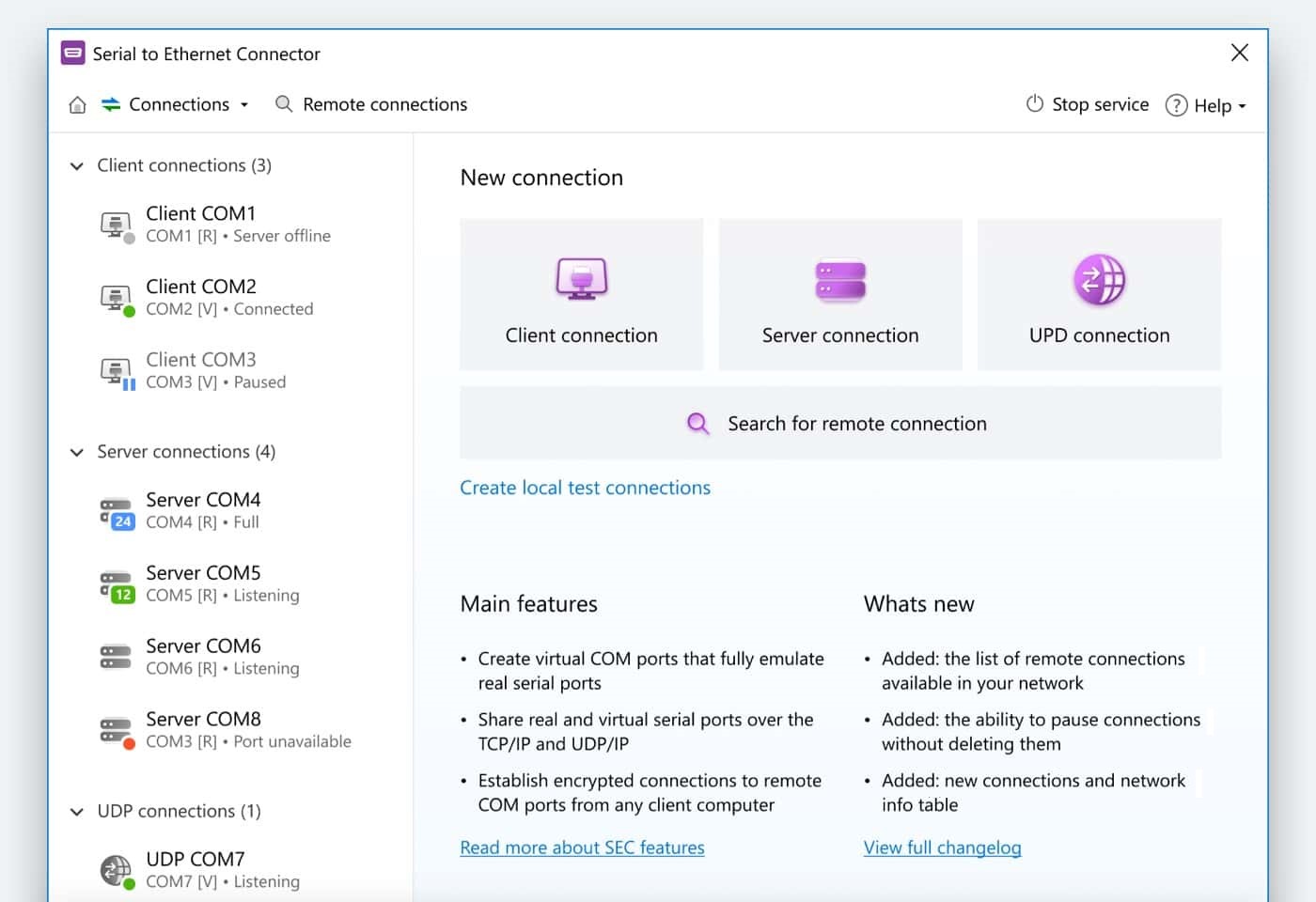
Serial to Ethernet Connector will help you to connect numerous serial port devices to your computer remotely. There is no need to have a serial port device attached to your computer directly, as you can now access a virtual COM port over Ethernet with a shared device from any place in the world. The software creates virtual serial port over Ethernet connections and you get full advantage of working with remote COM over Ethernet.
Looking for integration options?
Whether you're looking at redistributing our Serial port redirection engine as a part of your product or considering Serial over Ethernet software for an enterprise-wide deployment, we offer flexible and affordable corporate solutions designed to meet your needs.

Support for USB and serial port connections

Working with TCP, UDP, RDP, and Citrix protocols

Integration as DLL and ActiveX or Core level usage
Looking for integration options?
We offer flexible and affordable corporate solutions designed to meet your needs. Learn more
Serial over Ethernet software key benefits
Serial to Ethernet Connector is a solution that will easily let you share numerous RS232/RS422/RS485 serial interface devices over network, be it Ethernet LAN or Internet. When the existing serial device sends communication data, it is transmitted over Ethernet to the controlling software and vice versa.
-
Share serial port for incoming connections (Server)
Server connection will be waiting for incoming client connections and actually will share local real or virtual serial port over Ethernet. Server connection provides the ability to connect many clients simultaneously without any serial over Ethernet cables and each connected client is able to transmit input/output serial data to their local real or virtual serial port while Serial to Ethernet Connector automatically joins these data streams on server. Client can be any application that can initialize outgoing connection to TCP/IP server. -
Connect serial port to remote host (Client)
Creating client connection will initiate local real or virtual serial port data redirection to the remote serial device server using TCP/IP protocol. Client connection not necessarily requires SEC presence at the remote side. All that you have to do is specify remote server's IP address (or network name) and TCP port to connect to. Once connection is established, all communications will go over Ethernet. -
Share serial port using UDP
You can redirect input/output data from local real or virtual serial port using UDP/IP as a transport protocol. This type of connection does not require SEC presence at the remote side as well. Besides, in this way you can broadcast all serial data over your local network.
Serial to Ethernet Connector lets you select data transmission protocol, which will be used for connection: RAW data transmission algorithm or Telnet (RFC 2217) protocol. -
Serial to Ethernet Connector for Linux OS is available
Serial to Ethernet Connector is also available for Linux OS! Now you can choose whether Linux or Windows OS will be a client or a server; broadcasting over UDP is possible too. Note, that Linux version is a command-line product at the moment.
Download Serial to Ethernet Connector for Linux OS now!
Linux version for ARM-based devices is available. Now you can share serial ports on ARM devices or connect to remote devices. Note: you need D-Bus to be installed on your device to use this version.
How to share Serial over Ethernet?

1
Download and install Serial to Ethernet Connector on server computer. This is the machine that contains the physical or virtual COM port that will be shared.
2
Launch the application and select New connection -> Server connection. Now you can name the connection as well as identify the serial interface, and the TCP port for monitoring. Click the “Create connection” button.
3
Next, install the software on the client computer. Select New connection -> Client connection and use the IP address of the server and TCP port specified when you created the connection. You can create virtual serial ports here by specifying “Create as virtual port” option.
4
Click “Create client connection”.
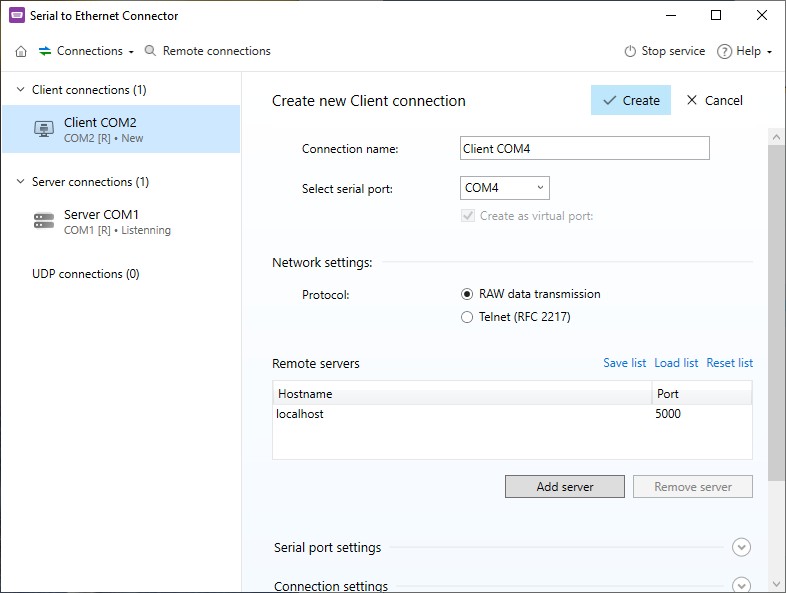
Now the client machine can access all physical serial port data. Data can flow in both directions between the server’s real COM port and the client’s virtual COM port.
Serial to Ethernet Connector features worth mentioning
With our software you can take RS232 over Ethernet sharing to the next level.
Send and receive RAW data
You can select RAW data transmission protocol, which will be used for the connection. During a raw serial over TCP session, all data will be transmitted as it is sent, without any protocol-specific application-layer formatting.
Change COM port parameters remotely
With the Telnet protocol (RFC 2217) the server and the client are able to exchange the COM ports configuration and have the ability to notify the remote host of any changes in the settings or the line states of the local COM ports.
Works as Windows service
Serial over Ethernet software runs as a Windows service. This ensures that all connections are automatically reconfigured on system boot, before user login. In addition, that means that the interface can be safely closed after configuring all settings, and all your serial over LAN connections will be still maintained.
Smart data sending
Apply settings that will help you control the way the data is sent over the serial to network connection. Add pauses between the network packets or accumulate data in a buffer for a specific amount of time or until it reaches a specified size before being sent, etc.
Our Customers real-life experience
Throughout its long history, our software has helped a lot of people to solve a variety of tasks and problems of absolutely different kinds. And here are some of them:
We have a limited quantity of instruments in our quality control laboratory. The instruments are connected to computers via serial ports. To avoid constant relocation and re-calibration of the appliances we decided to resort to Serial to Ethernet Connector, and now have a terminal server that every employee has an access to and use every instrument at any given time.
Ellen Bishop, Pollution Control Engineer
Our engineers have integrated Serial to Ethernet functionality into our industrial automation system of the oil rig machines’ diagnostic software, so service personnel can detect any issues that affect the system’s state. In this way, diagnostic and predictive measures can be performed and provided to field personnel so that they can concentrate their efforts on the drilling operation instead of maintenance procedures.
William Newman, Efficiency Engineer
In a nutshell, I was looking for a way to map a COM port with a TAPI device attached to it to a client Citrix XenDesktop session. Since TAPI devices could not be mapped to client COM ports in XenDesktop, my attention was drawn by Serial to Ethernet Connector. The app made possible a serial tunnelling by extending a serial link across Ethernet to a virtual environment.
Ted Robertson, Communications Engineer
High safety standards are a must in our company, so we demand the same from the software that is used in our work. We have chosen Serial to Ethernet Connector for the password authentication and traffic encryption, which is significant when working with the point of sale terminals. These are the features that distinguish it from any other software-based serial device server on the market.
Carroll Peters, Process Control Programmer
Serial over Ethernet software can offer
| # | Feature | Windows | Linux |
|---|---|---|---|
| 1 | Share your serial ports and devices with others over TCP/IP network | ||
| 2 | Both TCP/IP and UDP/IP protocols are supported | ||
| 3 | Easily connect to remote computer using TCP/IP Telnet protocol, with the RFC 2217 Telnet extensions for COM Port Control | ||
| 4 | Share an unlimited number of serial ports simultaneously for remote connections | ||
| 5 | No limitation on the quantity of virtual serial ports or connections created (except your system resources) | ||
| 6 | Manage port signal lines states in connections | (for real ports only) | |
| 7 | Verify connection's integrity by using "send command to keep connection alive" feature | ||
| 8 | Ability to send data on certain event (when block of data reaches certain size, on receiving special char and on certain timeouts) | ||
| 9 | Serial port names are not restricted to COMxx only and may have virtually any name | ||
| 10 | High speed data exchange from/to virtual RS232 serial port (up to 256 Kbits) |
Frequently asked questions about
Serial over Ethernet software
Serial to Ethernet technology is employed to create fast and reliable Ethernet connections allowing RS232, RS422, and RS485 devices to communicate with each other and serial applications. The main responsibility of this technology is to translate data transmitted by the various serial protocols.
In this way devices using diverse serial protocols can successfully communicate over the network.
In this way devices using diverse serial protocols can successfully communicate over the network.
The speed of RS-232 interfaces is measured by the number of bits transmitted per second (bps). There are many different communication speeds that you will find in serial transmission including:
110, 300, 600, 1200, 2400, 4800, 9600, 14400, 19200, 38400, 56000, 57600, 115200, 128000 and 256000 bps. The start, stop, and parity bits are not relevant in determining the effective transmission rate of a serial connection.
Serial to Ethernet Connector fully supports data transfer speeds through the virtual ports it creates of up to 256000 bps.
110, 300, 600, 1200, 2400, 4800, 9600, 14400, 19200, 38400, 56000, 57600, 115200, 128000 and 256000 bps. The start, stop, and parity bits are not relevant in determining the effective transmission rate of a serial connection.
Serial to Ethernet Connector fully supports data transfer speeds through the virtual ports it creates of up to 256000 bps.
The same virtualization technology that allows you to access serial devices without a COM port lets you establish RS232 over IP connectivity to network-attached equipment. Once connected, you have the same level of control over the device as if it was directly connected to your computer. Serial over Ethernet Connector can be used in many scenarios to enable network communication between your serial devices.
Serial to Ethernet Connector has no distance limitations, making it possible to connect virtual serial ports over Ethernet no matter where they are physically located. Simply install the application on the machine with a direct connection to the device and all remote client computers that need access to it. Your IP network is then used to allow the clients to remotely access and control the devices.
Linux users can also take advantage of the capacities of Serial to Ethernet Connector. All of the functionality afforded to Windows users is replicated in the Linux version of this virtualization software which can be downloaded to any Linux machine.
In addition to using Serial to Ethernet Connector, there are native methods available on most modern distributions that allow you to set up a free virtual serial port over Ethernet.
In addition to using Serial to Ethernet Connector, there are native methods available on most modern distributions that allow you to set up a free virtual serial port over Ethernet.
What customers say
Next
-
- 4.9
What I absolutely love about Serial to Ethernet Connector is that it works in a similar way to standard Windows services. Even if I mistakenly closed the app’s tab, all the virtual serial ports and network connections I’ve created with it will stay put. Read the full review...
Read all reviews
based on 243 reviews


#1 at Serial Port Software
Serial to Ethernet Connector
Access remote serial port over IP Network for Windows
4.7 rank
based on
243
+ users
Get a download link for your desktop
Submit your email address to get a link for quick download on your desktop and get started!
Submit your email address to get a link for quick download on your desktop and get started!
or
Information
Requirements:
Category: Serial Port Software
Demo Limitations:
14-day trial period
Pricing: Starts from $259.95
Languages:
Deutsch, English, Français, Español
The registered users of the previous version can upgrade with a 50% discount. Learn more
Also Available:
Serial to Ethernet Connector [Linux]
Requirements: Linux 32-bit or 64-bit
Version 8.0.822 (25 May, 2021) Download the trial version →
Version 8.0.822 (25 May, 2021) Download the trial version →