Most free remote-desktop tools hold up fine for a quick fix, then start working against you the moment a task runs long: a warning banner, a countdown, a hard stop somewhere around the 60-minute mark. This decides whether you finish a patch cycle in one connection or get cut off mid-reboot and have to reconnect to a machine that’s not even back online. HelpWire has no session time limits – its free remote desktop sessions run as long as needed, including for commercial IT use. Below is what that means in technical terms, and how it holds up against the alternatives.
Why session length matters for IT work specifically
A session-length cap doesn’t just interrupt a conversation, but it can end a session in the middle of work:
Patch and update cycles: Updates frequently require a reboot followed by a reconnection to confirm the machine came back clean. A time-boxed session can force a fresh connection at the worst possible moment.
Migrations and large transfers: Profile migrations, dataset syncs, or large file transfers over a slow link can easily run past the session time limit.
Driver installs and configuration changes that require a restart: These tasks also require a reboot and a follow-up connection to verify the changes, which makes hard session limits a problem.
Long or intermittent troubleshooting: Issues that don’t appear on demand or support sessions with non-technical users often take longer than a fixed session window allows.
No timer counting down toward a cutoff, no matter how long the task runs.
No “your session will end in 5 minutes” message mid-patch or mid-transfer.
No forced disconnection at a set number of minutes.
The same behavior on the free tier as on any paid tier – session duration isn’t a paywalled feature.
You can reconnect automatically after the remote machine reboots or the user logs out. So a patch-and-verify cycle doesn’t require restarting the connection from scratch.
Checking HelpWire’s no-session-limits claim
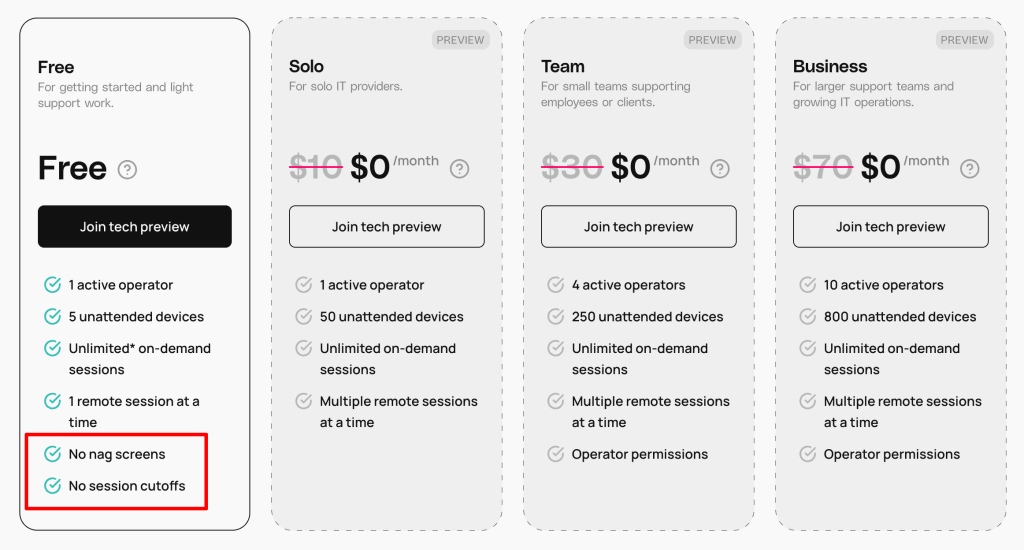
HelpWire’s pricing page makes it clear that the Free plan includes “No nag screens” and “No session cutoffs.” For a technical workflow, that translates directly: sessions aren’t interrupted by time restrictions or forced reconnections. So a long patch window, a migration, or an extended troubleshooting session isn’t fighting the tool on top of the actual problem.
How HelpWire stacks up for IT support
Tool
Session time limit
Free for commercial use
Starting price
TeamViewer
Free-tier sessions that appear to be used commercially may be flagged and terminated after a few minutes.
No
Free for personal use. Paid from ~$24/month.
AnyDesk
No hard-coded limit, but free-tier sessions commonly disconnect after around 5-60 minutes. Sessions flagged for commercial use may be interrupted within minutes.
No
Free for personal use. Paid from ~$28/month.
RustDesk
No time limit, whether self-hosted or on the public relay.
Yes
Free/self-hosted
HelpWire
No session time limit.
Yes
Free
Note that competitor figures are pulled from public pricing pages and shift over time.
Common questions
No, sessions run without a built-in duration cap – a five-minute fix and a multi-hour migration behave the same way.
Yes. The free tier isn’t restricted to personal use.
No. There’s no commercial-use detection that flags or interrupts a session based on how it’s being used.
Nothing. The session keeps going the same way it started.