
With more of us relying on USB gadgets, scanners, webcams, mics, and smartphones, having network access to them has become important for both work and security.
A lot of hobbyists go for VirtualHere since it’s affordable, though bigger companies can hit some limits. It doesn’t isolate RDP or Terminal Server sessions, which is important for corporate use. Also, its licenses are tied to specific hardware and can’t be transferred, and setting it up on a network requires manual port forwarding and NAT traversal. On top of that, it only allows one-to-one sharing, so multiple users can’t easily access devices. These issues can create security risks, scalability problems, and IT headaches in larger teams.
Let’s take a look at two professional VirtualHere alternatives: FlexiHub and USB Network Gate. They come with features like automatic NAT bypass, encryption, Citrix ICA support, and strong multi-user session isolation. These features make them a better fit for enterprise environments.
VirtualHere Key Drawbacks
1. Hardware-locked, non-transferable licensing
The license in VirtualHere is tied to the server hardware. That means if you swap out or upgrade your Pi, NAS, or Shield, the license won’t transfer. You have to buy a new one instead.
Many Reddit users looking for alternatives flag the “license bound to the server hardware” policy as a major pain point when they need to replace or upgrade devices.
2. Stability: frequent disconnects and crashes
Connection lost, and glitches also happen, according to users. Having complicated setups or using different devices often causes those issues to happen.
One Windows 11 user reported that the client and server kept crashing or disappearing and had to be restarted manually every time.
Another user testing a Raspberry Pi with Android hardware said they experienced “2–3 disconnects and reconnects per minute” even with a simple USB flash drive. (VirtualHere forum)
3. Network & WAN complexity (ports, NAT, VPN)
Setting up VirtualHere across different networks can be tricky because of the several steps that need to be done. You must manually configure firewalls or forward a port, and also get your VPN ready. And that’s why remote access is more complicated than plug-and-play cloud options.
Many users run into connection issues most of the time. For instance, one person couldn’t link their Windows client to an Android server until they sorted out port and firewall settings.
4. Multi-user limits & lack of session isolation
VirtualHere shares USB devices at the OS level, not per user or per session. This means only one client can use a device at a time. Allowing multiple users usually requires manual workarounds or custom scripts, since there are no built-in session-aware or timeout features.
5. Security & enterprise manageability
VirtualHere does support SSL/TLS encryption, but turning it on means editing config.ini files by hand, which can sometimes create compatibility issues. Managing devices for a business is also tricky, since it depends on config files and scripts rather than a central dashboard or role-based controls.
For example, one user could connect without SSL, but their devices disappeared once SSL was turned on.
USB Network Gate – Best VirtualHere alternative for RDP, VDI & Multi-User Servers
USB Network Gate is a heavier-duty VirtualHere alternative built for setups that demand more — terminal servers, virtual desktops, and complex virtualized environments. Basic USB-over-LAN is mostly what the latter platform covers. USB Network Gate can do more than that. You’ll find it works well with Remote Desktop (RDP) and Citrix ICA, and also supports major hypervisors such as VMware and Hyper-V. On top of that, you can assign USB devices to individual users or RDP sessions with separate access using the software.
Moreover, USB Network Gate comes with strong security features like TLS encryption, password protection, activity tracking, and simple port-level sharing. You can see why it’s a better choice for multi-user Windows servers or environments that need tight security and controlled access.
Supported OS
Windows, Mac, Linux, and Android
Pricing
- License-based (one-time purchase)
- Starts at $159.95 for up to 10 devices
- Free to share 1 USB device
- Licenses can be transferred between machines
Why choose USB Network Gate over VirtualHere
- Smooth Cross-Platform Sharing: Lets you use devices shared from a Windows PC on macOS or Linux, so everything works together even in mixed setups.
- Strong Virtualization & RDP Support: You can redirect USB devices from the host to the guest OS in VMware, Hyper-V, or Citrix XenDesktop. Plus, you can reach your local USBs in Remote Desktop (RDP) and Citrix ICA sessions.
- RDP Session and User Isolation: Gives each device its own access, so it’s only available to a specific RDP session or Windows user, protecting things like security dongles or biometric devices on shared machines.
- Enhanced Security & Data Control: Ability to set passwords for remote access and encrypt data with TLS 1.3, so that you can safeguard information as it travels across the network.
- Port-Level Sharing: Option to share a USB port, so that all devices plugged into it can be used remotely right away, no extra server setup needed.
FlexiHub – Best When You Need USB and Serial (COM)
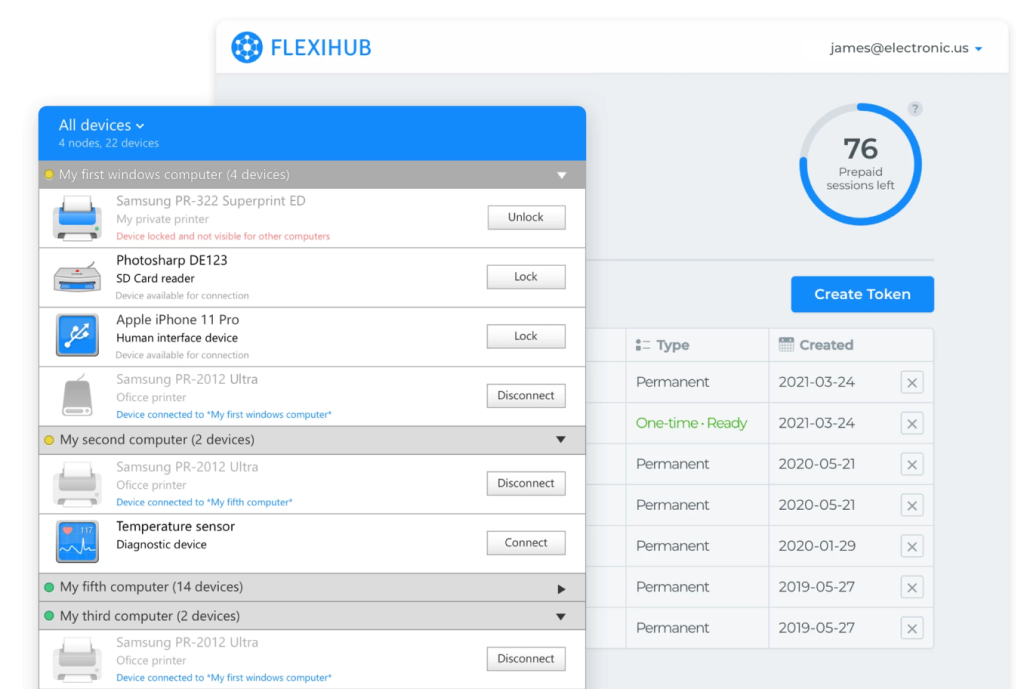
FlexiHub is also a strong alternative to VirtualHere, and one of its best features is that it works with both USB and serial (COM) ports. That means it can handle two common needs in industrial and office setups at once. With this app, you can give remote access to office devices like printers, scanners, and webcams. You can also connect professional equipment such as barcode scanners, surveillance cameras, and CNC machines. You’ll see all your devices in one easy-to-use interface, and Windows users can connect to serial (COM) ports too.
Supported OS
Windows, macOS, iOS, GNU/Linux, Android, and Raspberry Pi OS
Pricing
- Subscription-based model
- Personal plan: starts at $14/month (billed annually)
- Team plan: US$60/month for 5 members
- Business plan: starts at US$0.4 per connection (pay-as-you-go)
Why choose FlexiHub over VirtualHere
- USB & Serial (COM) Port Redirection: A key benefit that lets you manage both modern USB devices like printers and scanners, and older serial equipment such as PLCs or CNC machines, all from one app.
- Global Access via Redirection Server: Allows you to connect computers even if they’re behind firewalls or NATs using a private communication server, so you don’t need a complicated network setup or a public IP address.
- Strong Encryption for Sensitive Data: Protects connections to remote devices with SSL/TLS encryption (often listed as 256-bit), so it’s ideal for keeping industrial or healthcare data secure.
- Centralized Access Management: Offers a dashboard to oversee team members, control who can access each device remotely, and lock devices to prevent unauthorized connections.
- Remote Maintenance & Debugging: Lets you support teams fix and troubleshoot customer equipment (like smartphones, ECUs, or IoT devices) from anywhere, helping teams avoid unnecessary travel and lower expenses.
Best VirtualHere Alternatives: Features to Consider
| Parameter | FlexiHub | USB Network Gate | VirtualHere |
| Architecture | Cloud-Based | Server-Client (point-to-point USB over IP) | Server-Client |
| Operating Principle | Internet connection via account | Shares USB devices over TCP/IP (LAN, VPN, Internet) | Local Network, VPN, or Internet (via user setup) |
| Platform Support | Windows, macOS, Linux, Android, iOS | Windows, macOS, Linux, Android | Windows, macOS, Linux, Android, NAS |
| Connection Type | Internet (via cloud) | LAN, VPN, Internet (IP network) | LAN, VPN, or direct IP (Internet) |
| Functional Features | Encryption, web interface, and power management | Encryption, traffic compression, RDP/VM support, device isolation | Power management, multiple connections |
| Ease of Setup | High, intuitive interface | Moderate; GUI-based but needs installation/configuration | Moderate; simple for LAN, more technical for Internet/VPN |
| Data Security | Built-in encryption | Encrypted TLS 1.3 channel with optional password authorization | Depends on network security; Optional built-in encryption |
| COM Ports Support | Yes, supports remote access to COM ports | No native COM-port virtualization (USB only) | No native support for COM ports |
Conclusion
To wrap it up, picking between VirtualHere and VirtualHere alternatives: FlexiHub, and USB Network Gate mostly depends on what you’re trying to do and how much setup you’re willing to deal with. VirtualHere is the easiest one to live with long-term. It uses a straightforward server–client layout for LAN or VPN, and the one-time fee makes sense for people running smaller setups.
FlexiHub leans the other way: it’s more about convenience and being able to reach your devices from anywhere. You don’t need to dig into network settings thanks to its cloud system. Remote teams or folks who need quick, Internet-based access usually end up liking it for that reason.
USB Network Gate is the heavy-duty option. It’s built with bigger environments in mind—virtual machines, terminal servers, and RDP sessions. It has per-user/session controls, compression, and stronger security features. These are the aspects that companies tend to look for when they need stable, secure USB sharing for a lot of users at once.
Frequently Asked Questions (FAQs) on Best VirtualHere Alternatives
No, VirtualHere isn’t open source. It’s a proprietary product from VirtualHere Pty Ltd. You can download the client for free, and there’s a trial or limited version of the server, but to get the full USB Server functionality, you’ll need a paid license. The company calls it a perpetual, one-time purchase for each server machine—no monthly fees—which is how most commercial closed-source software works.
The key difference is in how they’re sold and managed. FlexiHub uses a subscription model with an internet-based, account-managed system. It’s more centralized, so you can connect through firewalls without messing with network settings, but you do need an internet connection. USB Network Gate, on the other hand, is a one-time purchase and allows you to connect devices on your LAN or remotely over the Internet. It’s more flexible for just local setups and comes with extras such as RDP integration and support for blade servers. However, it’s less centralized compared to FlexiHub.