

Modbus is a widely used industrial communication protocol that uses a master-slave architecture to exchange data across serial connections. These connections are RS-485, RS-422, and RS-232, and TCP/IP networks.
In this guide, we compare the best Modbus testing software tools, from professional platforms to widely used free alternatives, so you can find the right fit for your needs.
What is Modbus? Basic Principles Explained
- Modbus RTU for binary serial communication
- Modbus ASCII for character-based data exchange and easier troubleshooting
- TCP for Ethernet-based communication with an MBAP header
A Modbus network usually operates with a single Master responsible for initiating communication and as many as 247 Slaves that respond to commands.
| Type | What it does |
| Monitoring/analyzer | Analyzes live Modbus communication and decodes traffic without interfering with the existing connection |
| Splitter | Replicates one COM port data stream so it can be accessed by multiple applications simultaneously |
| Master & slave simulator | Provides a Modbus device emulation for testing workflows without the need for physical hardware |
| TCP sharing | Allows you to connect to a local serial device remotely by making it available over TCP/IP |
Modbus Monitoring Software for Testing and Diagnostics
Effective monitoring of live Modbus RTU and ASCII traffic requires specialized software that can intercept COM port activity in real-time while preserving the existing connection.
Below are the leading tools available:
Serial Port Monitor
Best for: Developers and engineers who need real-time monitoring and analysis of live Modbus RTU/ASCII communication on serial ports without affecting the active connection.
Modbus Protocol Analyzer offers a convenient way to track down the possible problems during development of an application or a driver, test and optimize serial devices, etc.
Key features:
- Connect to a serial port that is already in use by a different program and start monitoring it right there. All data received by the port is shown in real time for immediate tracking of any possible issues.
- Monitor several serial ports at the same time. You can analyze the activity of several Modbus ports in one session synchronously. Data flowing in both directions is conveniently recorded in a single log on a first-in first-out basis.
- See the captured data in a table, terminal, line, and dump views at the same time. You can use various filters for precise monitoring.
- Emulate the data transfer to a serial device to see exactly how it will react to specific commands.
Find out how to decode Modbus messages here.
Protocols: Modbus RTU and Modbus ASCII protocols operating across RS-232, RS-422, and RS-485.
Platform: Compatible with Windows 7/8/8.1/10/11 in both 32-bit and 64-bit versions, and Windows Server 2012, 2016, 2019, and Windows on ARM.
Price: Available under a paid license in Standard, Professional, and Company editions, with a free trial included.
Pros
- Supports non-intrusive monitoring over ports that are already open
- Ability to work with multiple ports at the same time
- Features a built-in Modbus decoder with a specialized Modbus monitoring view
- Includes session playback functionality
- Works with all COM port types, such as USB-to-RS232 and RS485 adapters
Cons
- Limited to Windows systems only
- Designed for serial port monitoring only, without Modbus TCP support
Modbus Poll
Best for: Technicians and automation engineers who require real-time graphing, multi-window monitoring, and data logging in a dependable master Modbus device simulator.
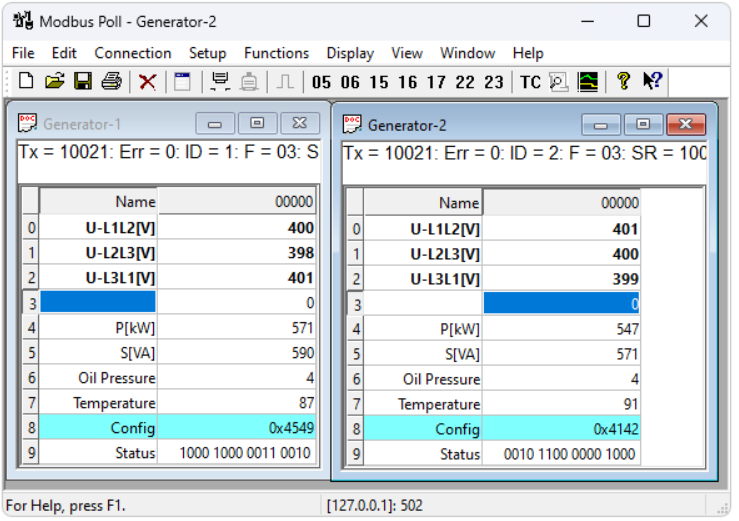
Modbus Poll is a popular Windows application for Modbus live monitoring and master simulation. It works well with Modbus RTU, ASCII, and TCP/IP to let users read and write registers, visualize data in real-time, and poll slave devices.
The multi-document interface makes it possible to open multiple independent poll windows at the same time, with each focused on different slaves or register groups. With more than 20 years in the industry, it has become a de facto standard tool for automation engineers across the world.
Features
- Supports a multi-document interface that allows multiple slaves to be monitored in separate windows at the same time
- Provides real-time data visualization through plots, gauges, and graphs
- Includes data logging capabilities with CSV and Excel export options
- Offers complete coverage of Modbus function codes
- Allows error injection for testing and analyzing slave error handling
- Provides command-line access and a DLL integration to support automation scenarios
Protocols: Compatible with Modbus RTU, ASCII, TCP/IP, and UDP communication standards.
Platform: Windows.
Price: Available with a 14-day free trial and a single-user license priced at approximately $99.
Pros
- Considered an industry-standard solution for testing and diagnostics
- Supports multi-window polling for simultaneous monitoring
- Feature-rich visualization tool
- Compatible with every Modbus function code
- Known for reliability and strong documentation
Cons
- Available only for Windows
- The interface may feel visually dated
- Can be difficult to learn for users unfamiliar with scripting
- Acts as an active Modbus master instead of functioning as a passive monitoring tool
QModMaster
Best for: Developers and engineers looking for a reliable, no-cost Modbus master with bus monitoring capabilities that support Windows and Linux.
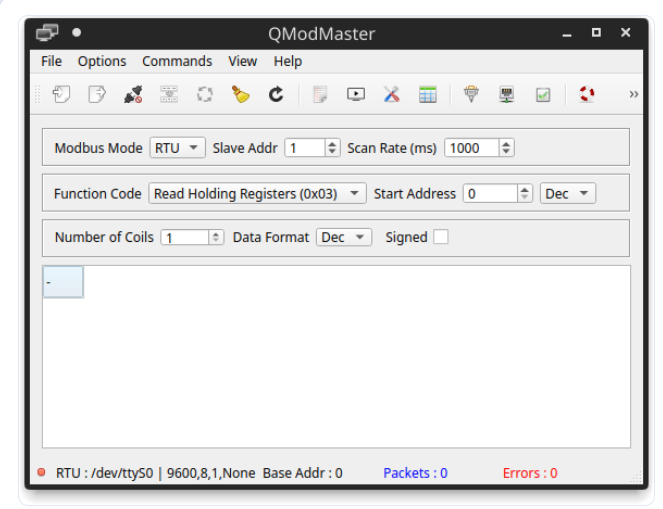
QModMaster provides a free and open-source Qt-based environment for working with Modbus TCP/IP, RTU, and ASCII protocols across Windows and Linux systems. It allows engineers and developers to monitor data from coils, holding registers, input registers, and discrete inputs, perform read or write operations, and connect to Modbus slave devices.
QModMaster offers a built-in bus monitor to analyze all traffic on the bus, plot real-time registers, and embed Perl scripting for running automated test sequences.
Features
- Features a built-in monitor for viewing all Modbus bus traffic in real-time
- Supports real and write operations for coils, holding registers, input registers, and discrete inputs
- Provides real-time visualization of register values
- Supports automated test sequences through an integrated Perl scripting engine
- Runs on Windows without installation, which allows users to unzip and use it immediately
Protocols: Compatible with Modbus RTU, ASCII, and TCP/IP communication standards.
Platform: Windows and Linux.
Price: Available as free and open-source software with a GPL license.
Pros
- Available at no cost
- Works on multiple operating systems
- Comes with bus monitoring functionality
- Includes scripting capabilities
- Can be used immediately without installation
Cons
- Offers a simpler, less polished UI compared to commercial software
- Provides limited official support from the developer
- Doesn’t include session playback or advanced data export capabilities
Modbus Data Splitting Software Solution
In practice, a single physical COM port may receive Modbus data that multiple applications need to process at the same time. However, this is not natively supported by serial ports because only one application can access a port at a time. A dedicated Modbus splitter software addresses this issue by creating multiple virtual copies of the port and replicating incoming data so each application receives it.
Virtual Serial Port Driver
Best for: Developers and Engineers who require the distribution of Modbus RTU data from one physical COM port to multiple applications at the same time.
Virtual COM Port Driver by Electronic Team is probably the most optimal solution for this task. The program works as a serial port splitter able to duplicate data coming into one COM port to an unlimited number of real and virtual serial interfaces. Virtual COM Port Driver will help you create as many virtual RS485 (RS232, RS422) ports as you need in your system. So if you want your Modbus traffic to be received by several apps simultaneously, you can simply create virtual copies of the master’s receiving COM port and connect the required apps to them. Virtual COM Port Driver will duplicate the traffic to all of the virtual copies of the real COM port and this way several apps will be able to receive the same data at a time.
Features
- Set up multiple virtual COM port pairs on your PC
- Allow a single physical COM port to distribute the same Modbus data to multiple applications in parallel
- Supports emulation of loopback connections and modern modem or handset line signals
- Aggregates multiple COM ports into a unified virtual interface
Protocols: Compatible with Modbus RTU and Modbus ASCII using RS-232, RS-422, and RS-485.
Platform: Runs on Windows XP, Vista, 7, 8, 8.1, 10, 11 in both 32-bit and 64-bit, and Windows Server 2003 to 2019.
Price: Commercial software available in Standard and PRO editions, and a free trial is available.
Pros
- No limit on virtual COM port pairs creation
- Supports live data duplication for multiple apps simultaneously
- Supports loopback and communication line emulation
- Fully software-based; no hardware required
- Build for reliable driver-level operation
Cons
- Designed for Windows platforms only
- Limited to serial port communications, with no support for Modbus TCP
com0com
Best for: Developers looking for a free virtual null-modem emulator for simple testing and development use.
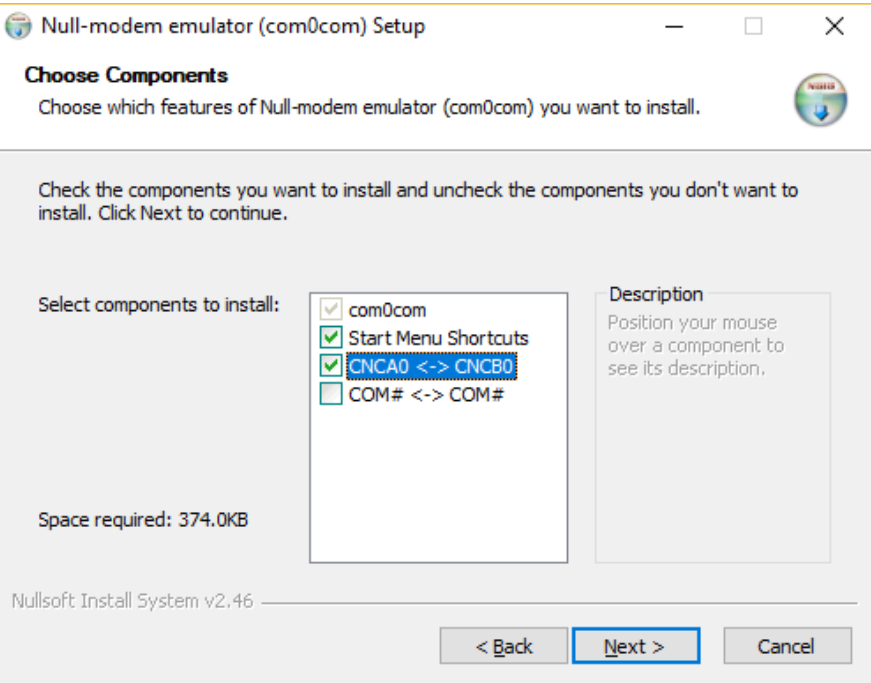
com0com is a Windows kernel-mode virtual serial port driver that is free and open-source. It creates pairs of virtual COM ports and links them through a virtual null-modem cable. This way, two applications can talk to each other just like they would over a real serial connection. You can set it up either through the command line or a simple GUI installer.
Features
- Generate virtual COM port pairs, such as COM5 ↔ COM6
- Uses a kernel-mode driver to support low-level compatibility
- Supports installation through a simple GUI and configuration through the command line
Protocols: Compatible with any serial protocol, such as Modbus RTU and ASCII.
Platform: Windows.
Price: Available as free and open-source.
Pros
- No cost required
- Built for reliable kernel-level stability
- Commonly used in software development environments
Cons
- Supports only single-destination output, with no splitting to multiple targets
- Lacks loopback emulation functionality
- No graphical interface for management is provided
- Doesn’t include official vendor support
- Not designed for production Modbus use cases
- May require turning off driver signature enforcement or enabling Windows Test Mode
Modbus TCP Software for Network-Based Serial Device Sharing
In industrial setups, a Modbus RTU device connects to one PC physically through a serial port, while several network users or systems need to access it simultaneously. Modbus TCP addresses this by translating the serial RTU connection into a TCP/IP stream. This makes the device available to all clients on the network.
Serial to Ethernet Connector
Best for: Engineers who need to provide TCP/IP access to a locally connected Modbus RTU serial device for multiple remote users or applications.
Electronic Team’s Serial to Ethernet Connector is a popular software application designed to share data from a locally connected Modbus serial device across an Ethernet network. It allows network users to communicate with the device as if they were locally connected, using a virtual COM port on their own computer.
Serial to Ethernet Connector can handle the sharing of over 255 serial port devices simultaneously. It operates as a Windows service in the background, so the application doesn’t need to stay open. The system automatically reconfigures all connections after a system reboot.
Features
- Provides the ability to share locally connected Modbus RTU serial devices over UDP or TCP/IP
- Connections from remote clients are made through a virtual COM port, preserving full device functionality
- Allow a single port to serve multiple clients simultaneously, with configurable read and write permissions per client
- Buffers data when the connection is lost and automatically sends it once the connection is restored
- Runs in the background as a Windows service without requiring the application to stay open
- Restores connections automatically within a user-defined timeout period
- Provides support for RAW and Telnet (RFC 2217) data communication protocols
- Includes traffic encryption and password protection for secure communication
- Designed for use in both Windows and Linux environments
- Allows exporting and importing configurations, with easy migration to another machine
Protocols: Supports Modbus RTU to Modbus TCP/IP and UDP conversion for serial-to-network communication.
Platform:
- Runs on Windows 7 SP1, 8, 10, 11 in both 32-bit and 64-bit, Windows Server 2008 R2 SP1–2022, and Windows 10 and 11 on ARM
- Complete Linux version (full edition)
Price: Available under a paid license and includes a 14-day free trial.
Pros
- Handles more than 255 devices
- Operates as a Windows service
- Supports data buffering when the connection is lost
- Control read/write access on a per-client basis
- Supports traffic encryption
- Designed for use across Linux and Windows environments
- Remote clients retain full serial functionality through a virtual COM port
Cons
- The software requires installation on server and client systems
Modbus Master and Slave Simulators
During development, Modbus simulation is essential. It allows master and slave systems to be tested against virtual counterparts without needing physical hardware on both sides.
Simply Modbus
Best for: Engineers looking for a simple and affordable Windows suite that supports both Modbus master and slave simulation over TCP and RTU.
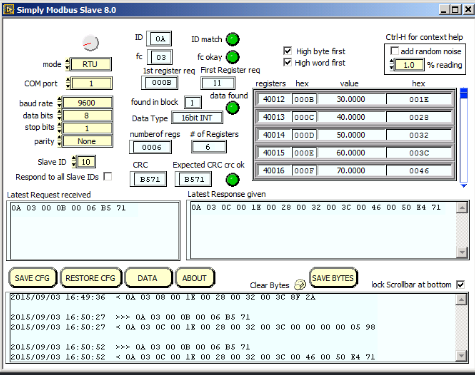
Built for Windows, Simply Modbus offers a suite of tools to test, simulate, and monitor Modbus TCP/IP and RTU/ASCII serial protocols. It provides a Modbus Master simulator, a Poll Manager for continuous real-time polling of registers, a Modbus Slave simulator, and a Data Recorder for Modbus traffic logging. The interface keeps things simple and minimal. You just configure the connection, select function codes, and start communication with minimal setup.
Features
- Modbus Master and Slave simulators in a single suite
- Features a Poll Manager for continuously polling and displaying registers in real-time
- Features a Data Recorder for logging Modbus traffic into files
- Allows multiple data formats with independent configuration for each register
- Supports Modbus RTU simulation over serial and Modbus TCP simulation over Ethernet
Protocols: Compatible with Modbus RTU, ASCII, and TCP/IP protocols.
Platform: Windows.
Price: Available under a paid license with cost-effective single-user plans and an optional site license.
Pros
- Includes both master and slave in a single package
- Simple and focused interface
- Budget-friendly
- Configuration of data formats on a per-register basis
- Available with a site license option
Cons
- UI appears outdated
- Available for Windows only
- Provides basic scripting and automation support
Modbus Slave
Best for: Automation engineers and developers who require running multiple Modbus slave simulations in parallel for comprehensive testing of master software.
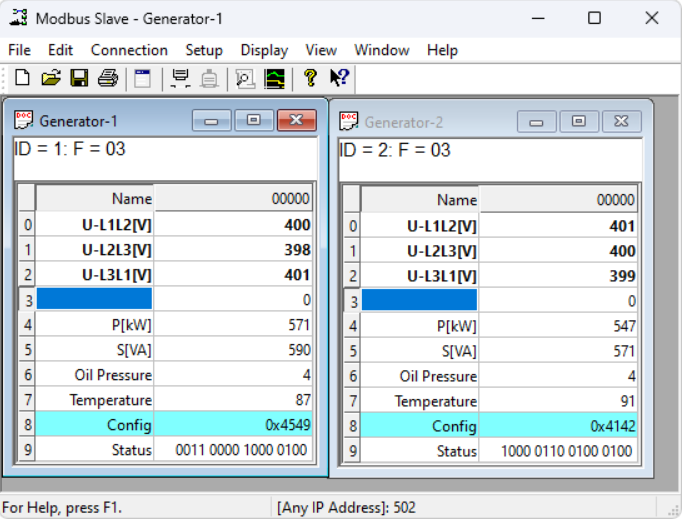
Modbus Slave by Witte Software serves as a professional-grade counterpart to Modbus Poll. It can run up to 100 independent slave windows simultaneously with a multi-document interface, each maintaining its own address, register map, and data values.
Modbus Slave integrates with Excel through OLE automation that allows structured test scenarios where register values follow scripts or data sets.
Features
- Supports up to 100 simultaneous slave windows, where each window is configured independently
- Excel integration via OLE automation allows the use of scripted test data
- Supports exception response simulation for testing master error handling
- Compatible with Modbus RTU, ASCII, TCP, and UDP protocols
- Includes a 30-day free trial
Protocols: Compatible with Modbus RTU, ASCII, TCP/IP, and UDP.
Platform: Windows
Price: Available with a 30-day free trial and a single-user license priced at around $99
Pros
- Supports up to 100 slave Windows
- Provides integration with Excel through OLE
- Provides support for all Modbus variants, such as RTU, ASCII, TCP/IP, and UDP
- Trusted vendor
Cons
- Available for Windows only
- Requires a paid license
- Uses an older-style user interface
Which Modbus Tool Fits Your Needs?
There are many Modbus tools available, and the best one depends on your specific task. If you need a passive monitor for serial traffic or you want to simulate hardware, share a device over a network, or actively test a device, there is a purpose-built solution for each scenario.
Check the table below to quickly find the right one for your needs.
| Task | Best tool |
| To monitor live RTU/ASCII traffic while keeping the connection uninterrupted | Serial Port Monitor |
| To query a Modbus slave device with requests | Modbus Poll |
| To run as a slave device to simulate a sensor or PLC | Simply Modbus Slave |
| To share a single serial port across multiple applications at the same time | Virtual Serial Port Driver |
| To connect to a serial device over a remote TCP/IP network | Serial to Ethernet Connector |
| To identify and resolve Modbus frame errors, such as CRC, function code, and bad response issues | Serial Port Monitor |
| Free tool for simple testing or learning purposes | QModMaster |
Frequently Asked Questions
QModMaster is a popular free Modbus tool that supports RTU and TCP, runs on Windows and Linux systems, and provides a built-in bus monitor. ModPoll is a lightweight, free CLI alternative. For non-intrusive monitoring or built-in Modbus frame decoding, Serial Port Monitor by Eltima provides a 14-day free trial.
Modbus RTU uses serial communication like RS-232 and RS-485 to transmit data in binary form. Whereas, Modbus TCP uses Ethernet and TCP/IP to run the same protocol and replaces serial framing with a 6-byte MBAP header. Most modern tools are compatible with both variants.
Serial Port Monitor by Eltima supports non-intrusive attachment to active COM ports and captures Modbus traffic in real time without affecting the application using the port.
You can use a Modbus master simulator, like free QModMaster or Modbus Poll, to test the slave device. It helps you read holding registers, connect to the device through TCP or serial, and compare the responses with expected values. QModMaster includes built-in Perl scripting for automated test sequences.
Serial ports do not support this natively because only one application can use the port at a time. Eltima’s Virtual Serial Port Driver duplicates the serial port and delivers incoming data to each connected application in real-time.
Modbus Poll functions as an active master simulator for sending requests to slave devices and viewing responses. Serial Port Monitor functions as a passive analyzer for intercepting and decoding traffic on active serial connections without transmitting requests. Although they serve different tasks, they are often combined in development workflows.