Many businesses still depend on legacy serial devices, such as RS-422, RS485, and RS-232. Secure and reliable network access to this equipment is a practical necessity and not a mere convenience.
Serial over LAN (SoL) is a technique that allows serial communication ports and devices to be accessed, monitored, and controlled through an IP network. Serial over LAN is commonly used for troubleshooting, remote device management, and monitoring in data centers, industrial automation, virtualized or cloud environments, and embedded systems where physical serial ports are not available. It is also widely referred to as serial over network or serial over Ethernet — all these terms describe the same core technology of transmitting RS-232/RS-422/RS-485 data over IP infrastructure.
There are two primary approaches to implementing Serial over LAN:
- Software-based solutions: This approach virtualizes serial ports and redirects them over Ethernet or IP networks. It’s a better choice for scenarios that demand flexible deployment, scalability, and reliable connectivity.
- Hardware-based serial-to-Ethernet devices: This approach depends on dedicated adapters or device servers. These are frequently deployed in industrial or isolated environments where a reliable, standalone device must remain continuously operational.
In this article, we compare software-based and hardware-based Serial over LAN methods, discuss which approach is suitable for which case, and help you choose the best approach for your operational and technical requirements.
Best Software Solutions for Serial over LAN and Ethernet
Why Choose a Software Serial over LAN Solution?
Serial over LAN software solutions virtualize physical serial ports and transmit serial data over Ethernet or IP networks. This method is commonly preferred in environments requiring flexibility, reliable remote access, and scalability.
Software solutions are highly suitable if you:
- Need a way to access and manage serial devices remotely over a network or the Internet
- Operate within virtual machines or cloud-based environments
- Looking to avoid the need to purchase and maintain dedicated hardware devices
- Require multiple clients or concurrent sessions accessing the same serial devices
Key Benefits:
- You don’t need physical adapters
- Quick and easy deployment with minimal configuration
- Allows serial devices to be accessed through virtual COM ports on remote systems
- Provides greater scalability while enabling efficient remote access to serial devices
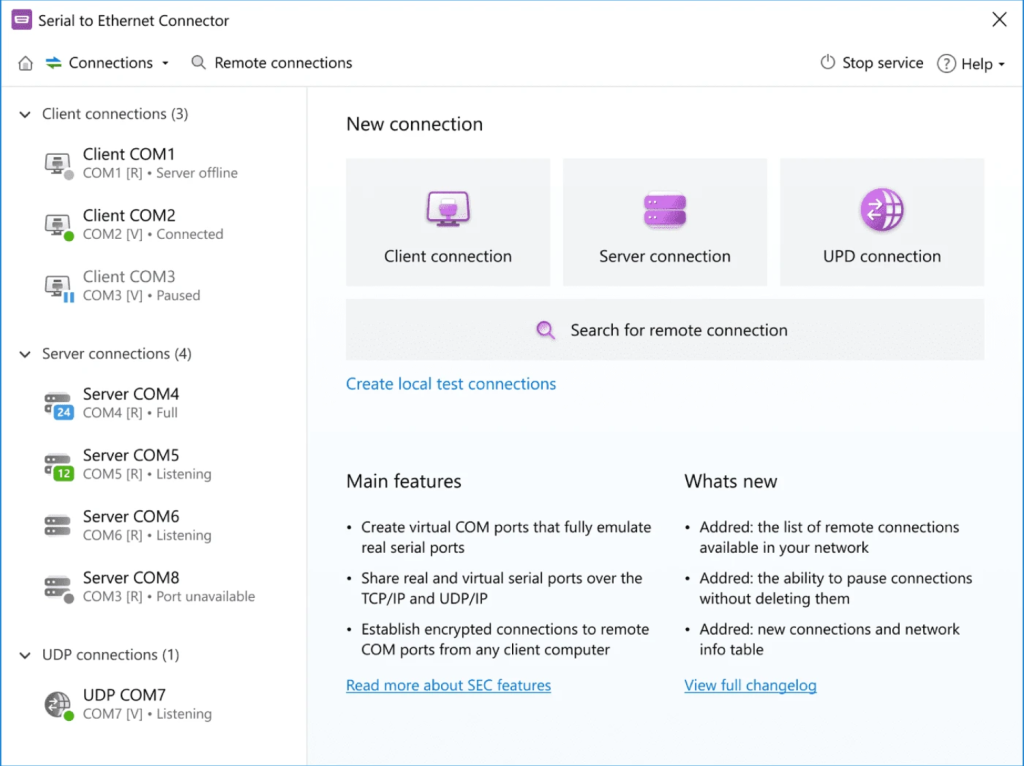
Serial to Ethernet Connector
Serial to Ethernet Connector is a professional solution that allows users to share, access, and redirect serial ports across LAN or IP networks. This enables remote communication with serial devices. The solution creates virtual COM ports on remote machines and securely connects them to physical serial devices using widely supported network protocols, such as RFC 2217, TCP, AND UDP.
Pricing
- $260: One-time purchase license (Compatible with: Windows 10, 11, Windows Server 2016/2019/2022 (32/64-bit), Linux.)
Pros
- Enables communication with devices that use the RS-232 serial interface;
- Has the ability to create and manage virtual COM ports;
- Provides multiple client-server configuration options;
- Offers built-in support for RFC 2217, TCP, and UDP protocols for flexible serial over IP software;
- Supports advanced configuration of serial port parameters;
- Designed to run on Serial over LAN Windows, and Linux operating systems.
Cons
- Requires a host computer to host and share the serial device across the network;
- Internet-based implementations require additional network configuration, such as port forwarding or firewall adjustments.
How to Share a Serial Port over LAN: A Step-by-Step Guide
The section below describes how Serial over LAN operates in real-world environments.
1. Download Serial to Ethernet Connector and install it on your computer (server) to which the device is physically connected. Do this also on your local computer (client) that will access the serial device over LAN. Here, the client can be any physical or virtual machine running a Windows or Linux operating system.
2. Launch the program on the server computer, configure the necessary parameters, and create a Server connection by clicking the appropriate button. The serial port device will then become accessible over the network.
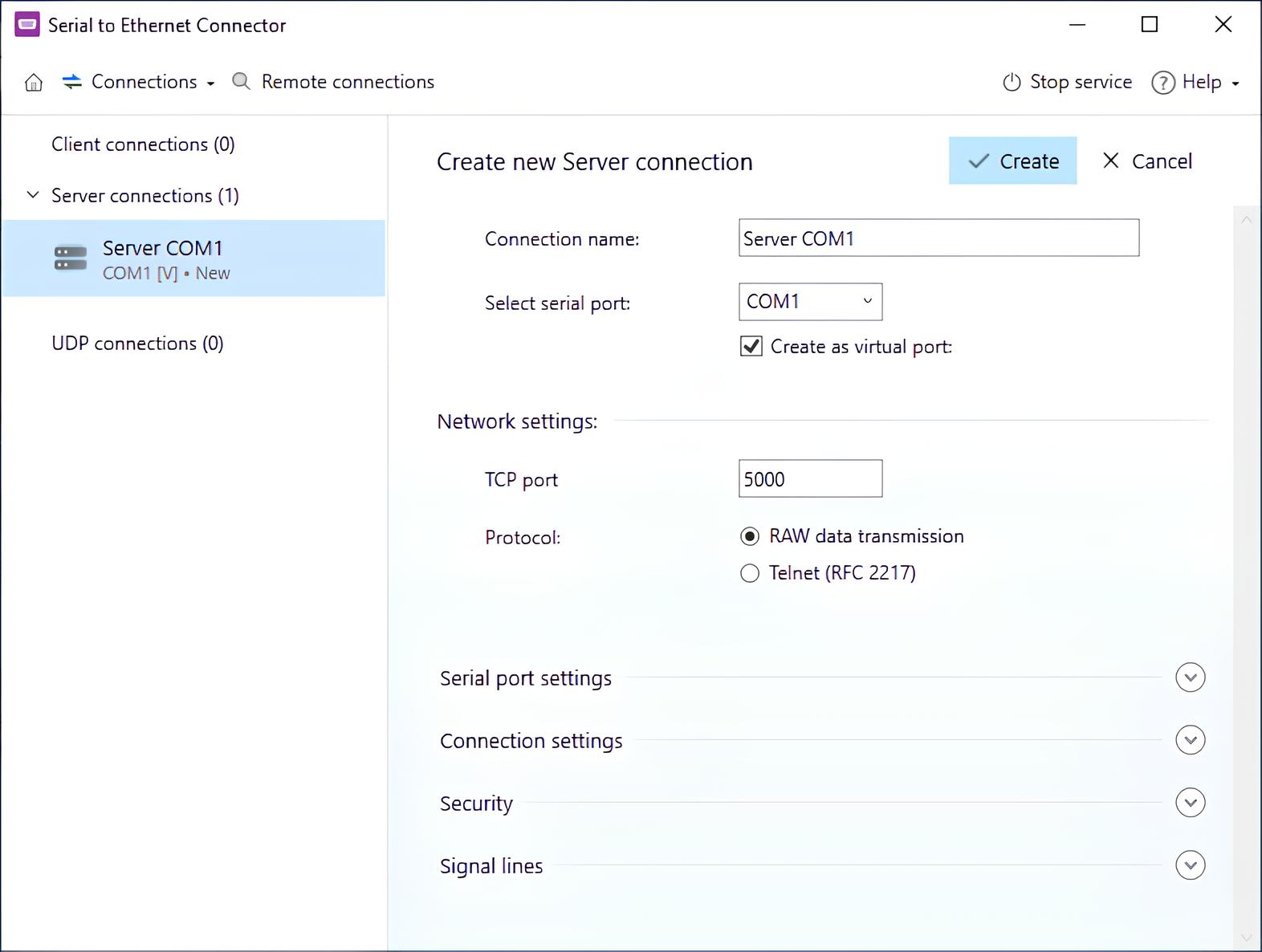
3. Finally, open the software on the client computer and click “Connect” to establish access to the serial port over the network.
Now, the setup is complete. The remote COM device will now be accessible on your computer as a locally available serial port.
For a detailed walkthrough of port forwarding scenarios, see our guide on serial port redirection.
How to Set Up Serial over LAN: Video Guide
When the client establishes a connection to the server machine, the software creates a virtual serial port on the client computer and links it to the server’s physical port through a virtual null-modem cable, to enable transparent serial communication.
Once the connection is established, the virtual port mirrors the behavior of the physical port on the remote machine. As a result, the Serial to Ethernet Connector allows you to share COM ports over a LAN quickly.
FlexiHub
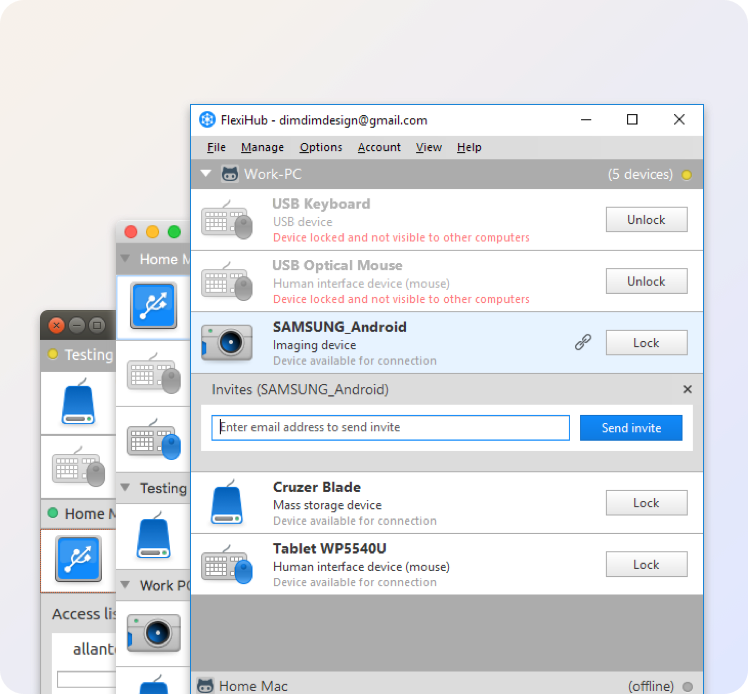
FlexiHub is a cloud-based Serial over Ethernet software solution that allows users to remotely access and share serial devices across LAN environments and Internet connections. The software relies on a centralized redirection server. It simplifies connection setups between machines even when they are located behind NAT routers or firewalls.
Price
- Starting from $39/month.
Pros
- Compatible with various platforms, such as Windows, Linux, macOS, and Android;
- Doesn’t require any public IP;
- Uses encrypted communication channels to secure data transmission;
- Allows quick and easy configuration for remote access to devices.
Cons
- Operates on a subscription-based pricing structure;
- Requires an active Internet connection to operate;
- Provides less detailed low-level serial configuration than dedicated serial management tools.
How to Set Up
1. You need to register an account and install FlexiHub on both machines to share the serial port over LAN. But note, that this software works only if you have an Internet connection.
2. Start FlexiHub and log in. On the first computer, you need to click Share in front of the serial port device. On the second computer, go to FlexiHub, locate the device you want to access, and click Connect.
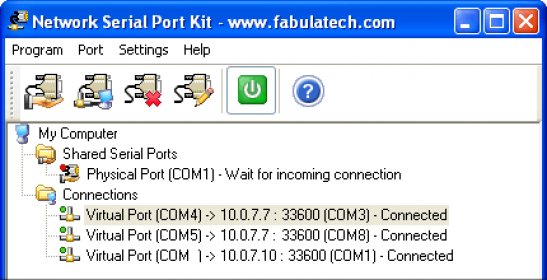
Network Serial Port Kit
Network Serial Port Kit is another software tool designed for COM port over LAN sharing. The serial over IP application makes a physical serial port accessible to other network-attached computers. This lets you connect your machine to a remotely located COM device simply and easily. The program fully emulates serial port internals so that the virtual ports look and function as if they were physical ports.
Network Serial Port Kit is supported on the Windows 32- and 64-bit operating systems and lets you share and access any number of serial devices.
Price
- Per-seat license (price depends on number of seats); 15-day free trial available.
Pros
- Supports Windows 7–11 and Windows Server 2016/2019/2022/2025, including ARM64;
- Runs as a Windows service — active before user login, survives reboots automatically;
- Supports unlimited number of shared serial devices;
- Virtual null-modem cable mode for connecting two applications over a network;
- SDK and Developer API available for OEM integration into third-party software.
Cons
- Windows only — no Linux or macOS support;
- Updates require an active subscription after the first 12 months;
- Outdated user interface despite functional core;
- Splitting one port to multiple clients requires a separate Serial Port Splitter add-on (sold separately).
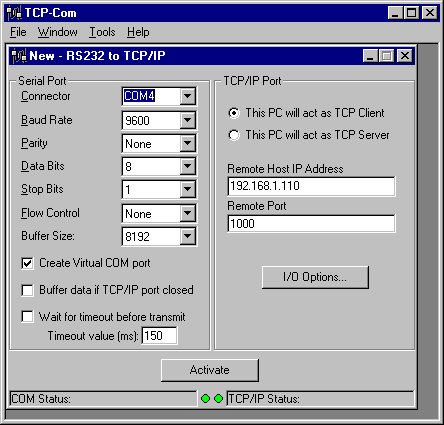
TCP/Com
TCP/Com program is a basic solution suitable for accessing serial devices as well as RS232 to LAN conversion implementations. Some of the connectivity tasks it can resolve include: turning a computer into a Serial Device Server; communicating over the network with any serial device or application; enacting remote control of Serial ports as if they were local; mapping of TCP/IP interfaces; split data from a single physical COM port and send it to multiple serial apps. It runs on versions of the Windows OS from 98 to Windows 10 (32- and 64-bit).
Price
- $199 one-time license per PC; 30-day free trial; 60-day money-back guarantee; discounted multi-seat pricing available.
Pros
- Supports up to 256 serial ports simultaneously on a single PC;
- Built-in COM port splitter — no separate add-on required;
- Can run as a Windows service (auto-starts before user login);
- One-time purchase with free technical support included;
- Supports TCP, UDP, and virtual COM port modes in a single tool.
Cons
- Windows only — no Linux or macOS support;
- Does not support RFC 2217 protocol, limiting compatibility with some hardware device servers;
- Dated interface with no major UX updates in recent years;
- No cloud or Internet relay — direct network connectivity required.
Hardware-Based Serial Over LAN Solutions
When Should You Choose a Hardware Serial over LAN Solutions?
Hardware physically integrates serial equipment directly into a network infrastructure using dedicated serial-to-Ethernet converters or device servers.
A hardware-based approach may be preferable if:
- There is a requirement for a dedicated, continuously operating, standalone solution
- There is no host computer available to permanently host the serial device
- The system operates in an industrial environment isolated from standard computing systems
However, when compared to software solutions, hardware devices may present several important disadvantages in terms of flexibility and scalability.
Disadvantages of Hardware-Based Serial over LAN Solution
- Provides only a predefined number of serial ports with limited expandability
- Involves a higher upfront cost compared to software-based solutions
- Offers limited scalability when expanding the number of connected devices
- Deployment requires physical installation and periodic hardware maintenance
- Provides minimum flexibility when integrating with virtual or cloud infrastructures
Moxa NPort
Moxa NPort devices are industrial-grade serial device servers commonly used to connect RS-232, RS-422, and RS-485 devices to communicate over Ethernet networks.
Price
- Ranges from $160.21 – $235.77.
Pros
- Built for industrial-level reliability;
- Provides support for multiple serial communication standards;
- Operates as a standalone hardware device;
- Standalone hardware operation.
Cons
- You’ll get one device per serial port;
- Offers limited scalability;
- Requires a higher investment compared to software alternatives.
The IOLAN Device Server
The IOLAN Device Server by Perle is an enterprise-grade solution that provides secure serial-to-Ethernet connectivity for integrating serial devices into network infrastructures.
Price
- Starts from $450.
Pros
- Provides advanced security and centralized management capabilities;
- Compatible with serial communication standards, such as RS-232, RS-422, and RS-485;
- Designed to meet the requirements of enterprise-level deployments.
Cons
- High cost;
- Complex for small or medium environments;
- Requires physical hardware installation and ongoing maintenance.
Anybus by HMS Networks
Anybus by HMS Networks and serial servers play an important role in many industrial automation and control systems.
Price
- Starting from $200.
Pros
- Built for industrial automation environments;
- Provides reliable performance in hardware-based environments;
- Compatible with multiple industrial networking protocols.
Cons
- Provides less flexibility compared to software solutions;
- Dependent on specific hardware;
- Less appropriate for modern IT and cloud-based workflows.
Software vs Hardware: Comparison Table
| Feature | Software Solutions | Hardware Solutions |
| Scalability | High | Limited |
| Setup complexity | Low | Medium–High |
| Virtual COM ports | ||
| Remote Internet access | Limited | |
| Cost efficiency | High | Lower |
| Maintenance | Minimal | Hardware-dependent |
Which Serial over LAN Solution is Right for You?
Software-based Serial over LAN solutions provide an ideal balance of flexibility, cost efficiency, and scalability compared to hardware alternatives for most enterprise and professional applications.
Businesses that require multiple client access, virtual COM ports, and integration with virtual devices or cloud infrastructure can use tools like Serial to Ethernet Connector.
If you need to monitor or debug serial port activity before redirecting it, Serial Port Monitor can help you capture and analyze COM port data.