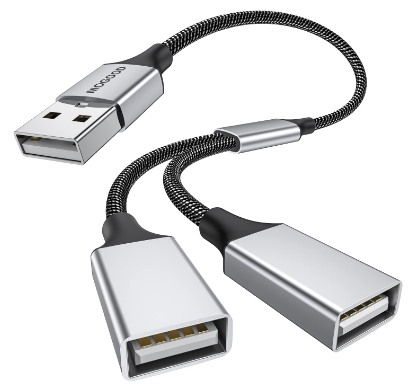
The Best USB Splitter Software for Sharing USB Devices Between Computers

It’s common for users to connect USB devices such as a printer or scanner to multiple computers. It can be frustrating to attempt to use a USB device simultaneously across machines using a physical USB splitter. These specialized hardware solutions often fail for several reasons, including power constraints, signal loss, or failure to process complex, low-level data from a USB device.

USB splitter software offers a more reliable way to share a USB device among multiple computers. A virtual USB splitter lets you share a USB peripheral with other local computers or network-connected machines located anywhere in the world. The solution leverages virtualization technology to create fast network tunnels, allowing remote computers to access a USB device physically connected to a local host machine.

USB Splitter Software

This article examines how a virtual USB splitter works and why it is a better option than a hardware solution. We also introduce a highly rated software utility that enables reliable, consistent USB sharing with local or remote computers.

The Problems With Physical USB Splitters

Hardware USB splitters typically run into USB protocol constraints that prevent them from delivering simultaneous, multi-computer access.

Issues with Hardware Hubs

The primary reason simple physical USB splitters are not effective for sharing devices is due to the USB protocol’s architecture. The USB protocol is designed to support a one-to-one relationship between a host and device. Hardware splitters attempt to allow two hosts to share a single connection, leading to a variety of issues.

  • No simultaneous access: Physical splitters cannot grant simultaneous access to multiple users and can only allow one computer to control the USB device.
  • Reduced signal stability: Hardware splitters may introduce power fluctuations or signal loss that affects USB devices, such as storage drives that need consistent power.
  • Conflicting session requests: Multiple computers may send control requests for the device, causing errors and dropped connections.
  • Device incompatibility: Many sensitive USB devices operate using timing and protocol details that physical splitters cannot support. This issue typically affects specialized medical devices, dongles, and authentication keys.

When to Use a Basic USB Hub

Physical splitters or USB hubs are an excellent solution if you want to duplicate ports on a single computer. USB hubs expand one physical USB port into multiple ports, enabling more flexible use of peripheral devices. 

The key factor in its performance is that only one computer controls connected USB devices. A hardware USB hub provides a convenient way to connect multiple devices, such as a mouse and keyboard, to a single computer.

Users seeking functionality beyond port expansion should strongly consider a USB sharing utility that leverages virtualization technology.

How Does USB Splitter Software Work?

USB splitter software virtualizes physical USB ports and connected devices, enabling remote access over a network. The software encapsulates data packets from the USB device and forwards them over a network, such as the Internet, LAN, or WAN. A remote client receives a virtual copy of the shared USB device and can access it with the same functionality as a local physical connection. Virtual USB splitters are often referred to as USB-over-network software.

How Remote USB Access Software Works

Remote USB access software utilizes two primary components.

  1. The server (host): This software component is installed on the host computer, which is physically connected to a USB device. The application collects and publishes the device’s raw USB data to the network.
  2. The remote computer (client): The client component is installed on the computer that will access the shared device. The software detects the shared device and establishes a virtual USB port on the client computer.


When the remote user connects to the device, the software handles all necessary drivers and data encryption, delivering a stable and secure session over any distance.

Key Benefits of Software Splitters over Hardware

Feature USB Splitter Software Physical Hardware Hub
Virtual Machine (VM) Support ✔️ Yes – commonly used in virtual environments ❌ No
Network connectivity over LAN/WAN ✔️ Yes – no distance constraints ❌ No – requires physical connection to the device
Compatibility with specialized devices such as dongles/keys ✔️ Yes – the software maintains low-level protocol ❌ Often results in dropped connections
Scalability ✔️ Yes – Highly scalable for increased flexibility and productivity ❌ Limited and unstable scalability
Security ✔️ Yes – Encrypted tunnels (TLS/SSL) ❌ Lacks security or encryption functionality

USB Network Gate: Top Program for Remote USB Connections

USB Network Gate is the top choice for reliable, enterprise-grade remote USB connectivity. Electronic Team, Inc., an experienced provider of port virtualization technology, developed this flexible software solution. USB Network Gate offers users a secure, stable USB sharing solution for any usage scenario.

Key Features of USB Network Gate

USB Network Gate is designed with the following features to handle demanding scenarios that typically cannot be met by hardware USB splitters.

  • Session management: The software ensures device stability and operational continuity by efficiently handling session disconnects and handoffs.
  • Strong encryption: All USB data is secured with advanced encryption protocols before transmission, protecting sensitive data on unsecured networks.
  • Bandwidth optimization: It compresses all traffic to reduce bandwidth usage and speed up data transmission.
  • Precise access control: Users can set passwords, deploy connection callbacks, and manage which users or computers can access a shared device for increased security.


USB Network Gate is an excellent solution for cross-platform environments, supporting multiple operating systems. The software supports USB passthrough to virtual machines in VMware, Hyper-V, and VirtualBox, eliminating the native limitations of many virtual environments.

How to Connect a USB Device to Two Computers

You can share a USB device with USB Network Gate by following these simple steps on the local and remote computers:

1. Plug your USB peripheral into the local computer (server) that will share the device over the network. Download USB Network Gate and install it on this PC, start the application.

2. Now, you’ll see the device in the “Share local USB devices” tab. In order to split it, click the ‘Share’ button next to the device.
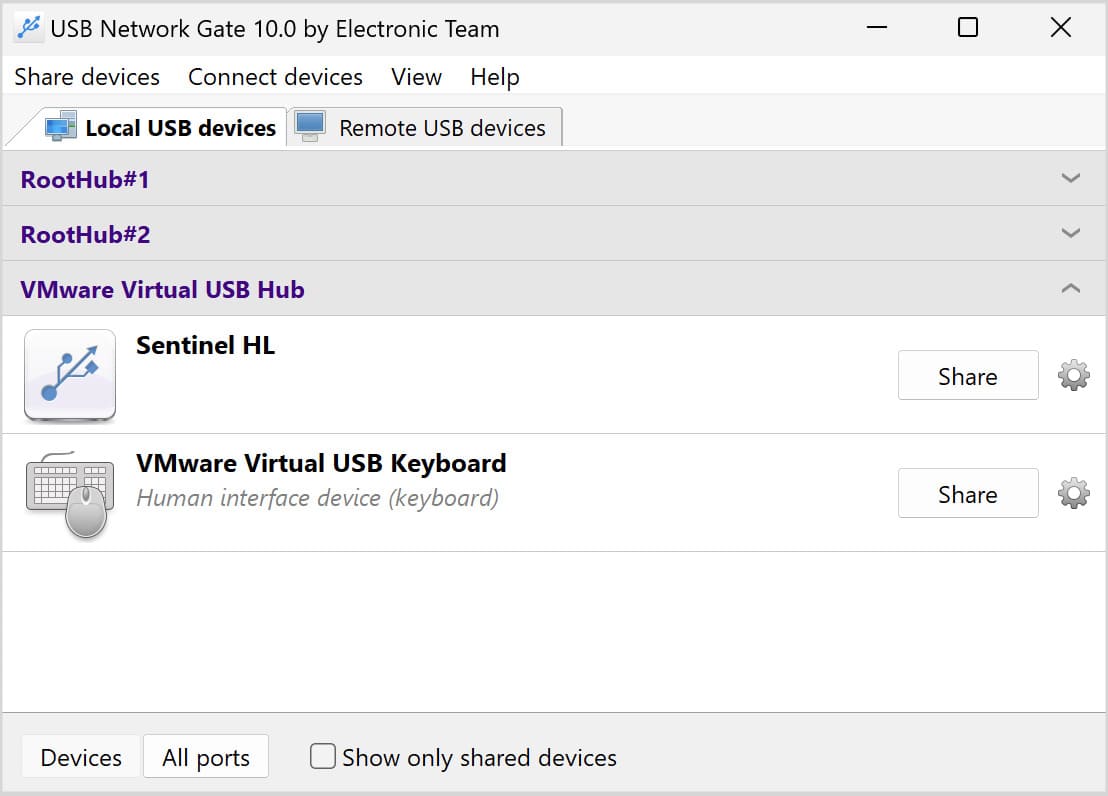
USB Network Gate: Share

3. Go to a remote computer (client). Download and install USB Network Gate there too. Launch the program, open the “Remote USB devices” tab and find the device in the list of the ones shared on the server machine. Click “Connect” to get access to the device.
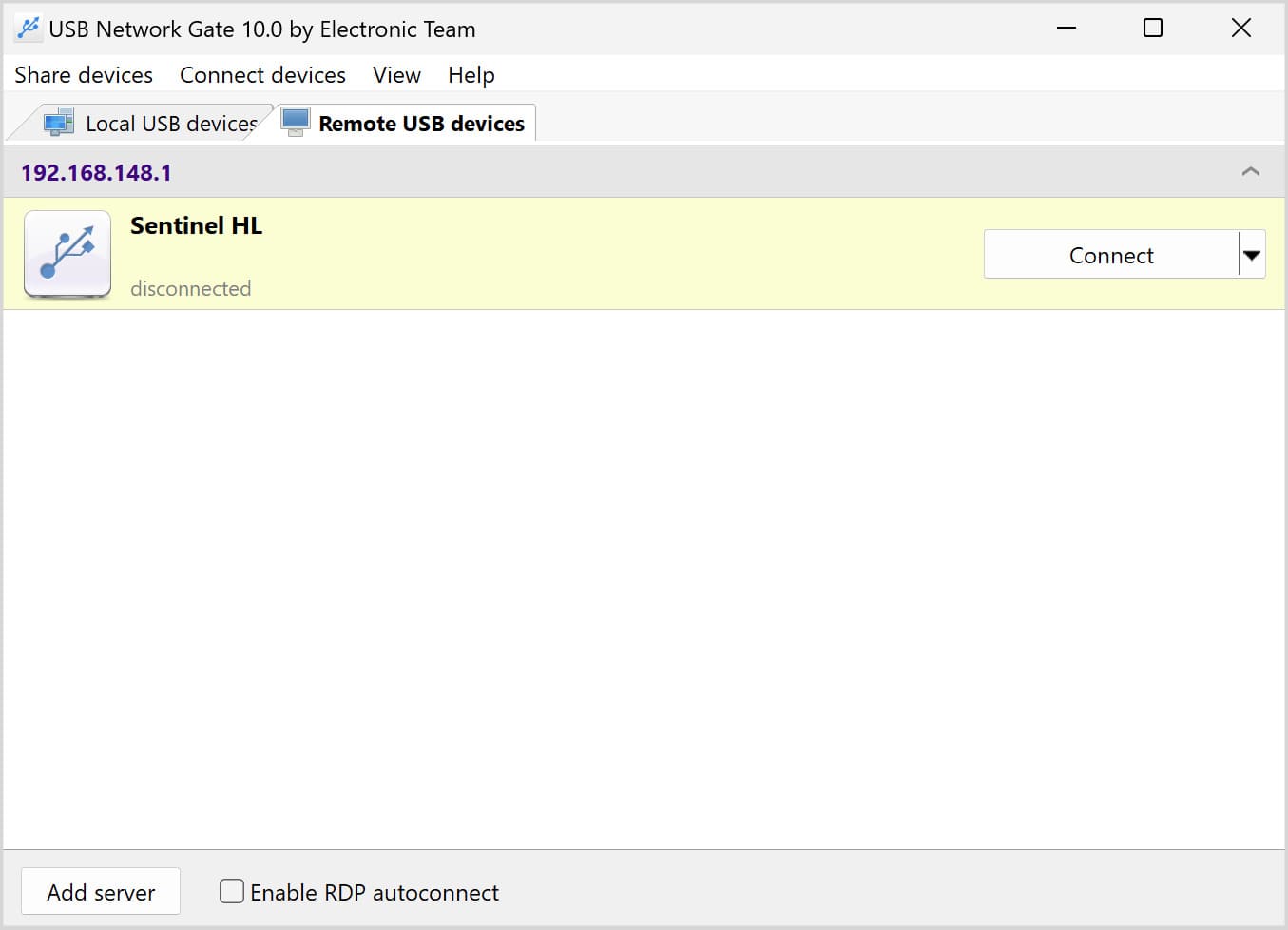
USB Network Gate: Connect

The remote computer now has complete, exclusive control over the shared USB device, giving it the same functionality as a direct physical connection to the peripheral. This method demonstrates how to use one USB printer for two computers.

Frequently Asked Questions

Yes. Modern tools, like USB Network Gate, are built with security in mind. They establish encrypted channels using the TLS/SSL protocols to protect sensitive or valuable data transmitted over a network from unauthorized access.

Yes, it can. Software is the most effective way to implement VirtualBox USB passthrough, or passthrough in other virtualization platforms, when native features are insufficient or do not support a particular device or operating system.

Yes, with professional-grade USB splitter software that supports multi-connectivity or access queues. Standard hardware splitters do not support this type of usage scenario.

Yes, with a software solution that encapsulates USB data into packets for transmission over a TCP/IP network. You can access the device from any location as long as you have the host machine’s IP address.

Yes, USB virtualization software preserves the low-level protocols necessary for efficient dongle functionality.