
A USB switch is a hardware or software solution that enables USB devices, such as keyboards, webcams, and storage devices, to be shared among multiple computers without physically swapping cables. A hardware USB switch is a simple device best suited for sharing USB peripherals in localized environments, such as an office. Modern teams may require the more flexible performance of a software USB switch to handle remote users and virtual machines.
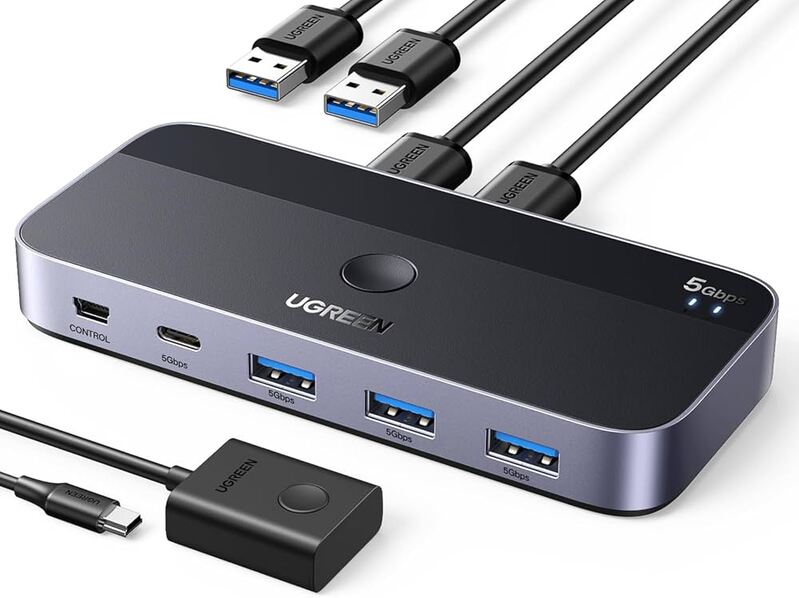
This article looks at how a USB switch enhances productivity and supports your investment in peripheral devices. We examine physical USB switches and software alternatives. Our comparison of the two USB switching solutions is designed to help you select the best one for your specific use case.
Hardware USB Switches
A hardware USB switch is a device that sits between USB peripherals and multiple computers. The switch redirects USB device control to different computers, allowing only one machine to access the device at a time. This type of switch is primarily used in offices and home environments where switching must be fast and straightforward, and where computers and peripherals are located in proximity.
Types of Hardware USB Switches
Different types of USB hardware switches are manufactured to address specific peripheral sharing requirements.
- USB Device Switch
Simple USB switches simply allow multiple computers, in an office or home, to share peripherals such as scanners and external hard drives. - USB Hub with Switching Functionality
A USB hub may be equipped with switching features that let users control access to peripherals by port, limiting which computers can connect to specific USB devices. - USB Printer Switch
This type of switch is a specialized solution that enables multiple computers to share a USB printer. USB printer switches are typically used in offices to improve productivity by allowing users to leverage a centralized printer without swapping cables. - KVM Switch with USB Peripheral Sharing
KVM switches let users share USB devices and switch keyboards, video equipment, and mice. The switch supports controlling multiple computers from a single workstation while sharing USB peripherals. - Network-Attached USB Hub
This type of physical USB hub allows users to access network-connected peripherals remotely and offers increased flexibility over simple hardware USB switches.
These USB switch alternatives address various usage requirements, but are all based on physical hardware, which may limit their usefulness in certain situations.
When Users Should Avoid USB Switches
Hardware USB switches are designed for simple, local environments. They are not typically appropriate for complex, distributed environments, such as:
- Virtualized environments requiring local USB devices to be shared with virtual machines;
- Centralizing device management in shared infrastructures;
- Remote access to USB devices over a network;
- Devices requiring low latency and stable, consistent connectivity.
Physical USB switches are not suitable for these use cases due to their limitations in proximity and cabling.
USB Network Gate: A Software-Controlled USB Switch
USB Network Gate is a software-based USB switching solution that supports sharing peripherals over an IP-based network, such as a LAN or the Internet. The software virtualizes USB devices so they can be accessed remotely over the network with the same functionality as with a direct physical connection.
USB Network Gate provides USB switching over LAN while the peripheral device remains physically attached to a single network-attached computer. Users don’t need to swap cables, and the application does not require any additional hardware. It is a remote USB switch solution that enables sharing USB services with network-connected machines without third-party servers or cloud services.
Advantages of USB Network Gate versus Hardware USB Switches
A software-based solution like USB Network Gate provides multiple advantages compared to physical USB switches. The benefits of USB Network Gate include:
- Eliminating distance limitations, allowing remote access to USB devices, no matter where they are located;
- Removing the need for manual switching or swapping cables;
- Reducing costs by eliminating the need for additional hardware components or cabling;
- Supporting modern workflows by enabling USB device sharing in virtual, remote, and distributed environments where hardware switches are not practical.
Implementing USB Network Gate for USB Switching
USB Network Gate is very easy to use, making its technical advantages available to all users. Three simple steps are all that is required to set up USB device sharing with no additional hardware or cable swaps.
- Download USB Network Gate and install on the computer with the physical connection to the USB device to be shared, and on the machines that will access it over the network.
- Start the application on the local machine and share it with other computers through the software’s user interface.
- Open USB Network Gate on a remote computer, then click on the shared device to establish a connection.
These three steps enable you to share USB devices over the network without physical USB switches or additional cables. USB Network Gate facilitates efficient device sharing while minimizing workspace clutter.
Comparing Hardware and Software USB Switches
Hardware and software USB switches are used to address different usage scenarios.
Hardware USB switches work best in local environments when computers are in proximity to each other, and only simple switching is necessary. They offer a basic plug-and-play method of sharing USB devices.
Software-controlled USB switching supports modern workloads and environments. Software-based switching is scalable, supports remote access, and provides centralized device management. This type of USB switching is more flexible and adaptable to evolving workflows by eliminating the physical limitations of hardware USB switches.
Comparison Chart
| Aspect | Hardware USB Switch | Software USB Switching |
| Distance limitations | Computers must be in physical proximity to devices and other machines | USB devices can be accessed remotely over a network |
| Switching method | Manual or automatic local switching | Controlled by software |
| Deployment | Requires a physical switch and USB cables | Works over the network using software |
| Device access | Only one computer at a time | Access is managed over the network for multiple machines |
| Workspace impact | Adds cables and physical devices to the workspace | Eliminates cable clutter |
| Scalability | Limited by physical limitations and available ports | Flexible scaling across networked systems |
| Hardware dependency | Requires additional hardware | No extra hardware required |
| Use cases | Simple, local desk-based setups | Remote, shared, and virtual environments |
Having compared the software and hardware methods it seems obvious, that the software solution, USB Network Gate, provides more benefits for users. It wirelessly connects devices regardless of the distance between them, works over the RDP channel, and can redirect USB to a virtual machine. On the other hand, the hardware tool is rather popular for its affordable price. But with the advanced functionality offered by USB Network Gate, its price seems to be fully justified.