 USB Network Gate
Free remote access to USB devices
USB Network Gate
Free remote access to USB devices
 Virtual Serial Port Driver
Creation and management of virtual COM ports
Virtual Serial Port Driver
Creation and management of virtual COM ports
 FlexiHub
Shared access to personal, team, and corporate devices
FlexiHub
Shared access to personal, team, and corporate devices
 Serial to Ethernet Connector
Remote access to COM-port devices
Serial to Ethernet Connector
Remote access to COM-port devices
 Donglify
Reliable connection to remote USB security dongles
Donglify
Reliable connection to remote USB security dongles
 Serial Port Monitor
Reading and recording of serial port data
Serial Port Monitor
Reading and recording of serial port data
 HelpWire
Remote Support Service
Explore All Solutions
HelpWire
Remote Support Service
Explore All Solutions
 USB Network Gate SDK
Build your own app with USB passthrough features
USB Network Gate SDK
Build your own app with USB passthrough features
 Serial to Ethernet Connector SDK
Build your app with COM port redirection functionality
Serial to Ethernet Connector SDK
Build your app with COM port redirection functionality
 Port Virtualization Technology
Add our redirection technology to your project
Port Virtualization Technology
Add our redirection technology to your project
 Virtual Serial Port Driver SDK
Improve your own software with COM port virtualization features
Virtual Serial Port Driver SDK
Improve your own software with COM port virtualization features
USB over RDP is free USB redirection software that allows remote desktop computers to access USB devices. It supports multiple network types, including the Internet, LAN, and Wi-Fi. USB Redirector RDP software enables users to securely share their USB ports by transmitting data over TCP/IP connections.
 Download available for: Windows, MacOS, Linux, Android

Free USB over Remote Desktop software allows PCs to access remote USB devices. This is achieved by creating virtual copies of serial ports physically connected to the USB device. These virtual copies enable a remote desktop to have full control over the devices. Using USB over RDP can make it function as though your USB device is directly connected to the remote PC.
Below are some advantages that using an RDP USB Redirector for your USB remote desktop issues has. These unique features set our USB Redirector for RDP apart, and you’ll soon see why.
Windows OS provides countless features, making it popular in the computer technology community. Unfortunately, Windows lacks one significant capability. Windows can’t control/isolate accessibility to USB devices. Any USBs connected to a Windows OS computer are available to anyone using the computer by default. It could be problematic for a computer accessed by many unique RDP sessions.
Free USB over RDP software lets users limit/control access to connected peripherals(USB devices)
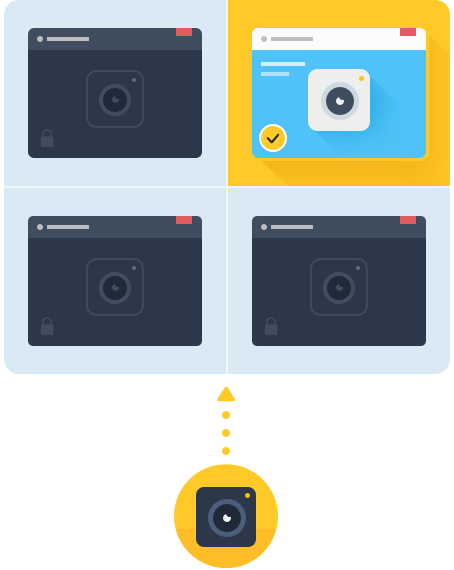
Limit access to USB devices based on a specified RDP session. A peripheral becomes invisible to any users outside of a particular session. This means unauthorized users outside of the session can’t access the device.
Limit USB device access based on a specified user profile. User-based isolation permits long-term device access to employees utilizing more than one account.
Note: USB device isolation functions on tons of different USB device types. Windows 8 and on support isolation for 3D mice, scanners, hard drives, printers, cameras- and most other USB devices.
Learn more about USB isolationAn RDP USB redirector should be in every tech-lovers tool box. So the below compare and contrast should help you find the perfect software for your needs.
And when it comes to an RDP USB redirector, there are many practical and effective solutions for redirecting USB over a network available. The table below compares three popular USB redirection RDP sharing software options on the market.
Follow the steps below to learn how to use USB redirector software to permit USB redirection RDP (remote desktop protocol) access on your computer.
You’re done! It’s that simple to use an RDP USB redirector. Free USB Device Redirection software was developed to be user-friendly no matter your skill level.
The shared device now appears on the remote PC. The device will function as if the client and USB are actually connected.
Find answers to common questions asked about USB redirection software below:





Flight Data Technician
Photography Enthusiast
Software Applications Engineer
Information Systems Manager
Architectures: x86, x64, ARM64 Run on macOS 10.15 or newer CentOS Stream 9+, Fedora 36+, Ubuntu 16.04+, Debian 10+, Linux Mint 20.1+ Android 5.0 and above