Serial communication might feel like legacy tech, but it’s far from dead. Whether you’re working with embedded systems, networking hardware, industrial equipment, or troubleshooting older devices, understanding serial cables still matters.
Two of the most commonly confused types are null modem cables and straight-through serial cables. They may look identical – but they serve completely different purposes.
Let’s break it down clearly.

What Is a Null Modem Cable?
A null modem cable is designed to connect two similar devices directly – without a modem in between.
How Null Modem Cable Works
- Transmit (TX) and receive (RX) lines are crossed
- Handshaking signals may also be rerouted
- Enables DTE ↔ DTE communication
Typical Use Cases
- Connecting two computers directly
- Data transfer between legacy systems
- Debugging embedded devices
- Lab testing environments
Why It's Called "Null Modem"?
The cable essentially eliminates the need for a modem, simulating its function by internally crossing signals.
What Is a Straight-Through Serial Cable?
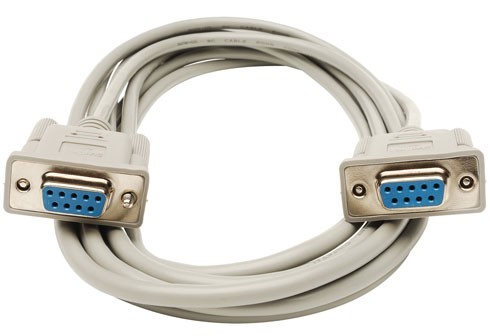
A straight-through serial cable is the simplest type of RS-232 cable. Each pin on one connector goes directly to the same pin on the other connector.
How It Works?
- Pin-to-pin wiring (1→1, 2→2, etc.)
- No signal crossover
- Designed for DTE ↔ DCE communication
Typical Use Cases
- Connecting a PC to a modem
- Serial communication with routers or switches
- Industrial equipment connections
Why It Matters
In traditional setups:
- DTE (Data Terminal Equipment) = computer
- DCE (Data Communication Equipment) = modem or peripheral
Straight-through cables assume this pairing.
Straight-Through vs Null Modem
The key difference:
- A straight-through serial cable connects a computer (DTE) to a device (DCE), like a modem.
- A null modem cable connects two similar devices (DTE to DTE) by crossing transmit and receive lines.
| Feature | Straight-Through Cable | Null Modem Cable |
| Wiring | Pin-to-pin | Crossed (TX ↔ RX) |
| Device Type | DTE ↔ DCE | DTE ↔ DTE |
| Common Use | PC to modem | PC to PC |
| Signal Flow | Direct | Redirected |
| Complexity | Simple | Slightly more complex |
Pinout Comparison (Simplified)
Straight-Through
- TX → TX
- RX → RX
Null Modem
- TX → RX
- RX → TX
Some null modem cables also cross:
- RTS ↔ CTS
- DTR ↔ DSR
This allows for proper handshaking between devices.
How to Tell Which Cable You Have
If you’re unsure what cable you’re holding, here are a few practical checks:
1. Visual Inspection (Limited Use)
They often look identical externally – this won’t reliably help.
2. Use a Multimeter
Check continuity between pins:
- Same pins connected → straight-through
- Crossed pins → null modem
3. Check Labeling or Documentation
Manufacturers sometimes label cables – but not always clearly.
4. Test It (Real-World Method)
- If two PCs can communicate → likely null modem
- If not → might be straight-through
Software Solution of Null Modem Connections
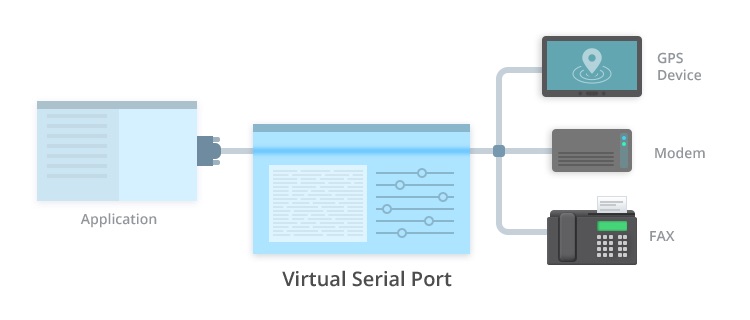
Null Modem Emulator will let you create an unlimited number of virtual COM ports and name them as you wish. They are seen in Device Manager just like any other port. Virtual serial ports created with this software emulate all serial port functionality and employ advanced Windows kernel driver technology to ensure full operating system support. The virtual ports also support all standard hardware signal lines like DTR/DSR, RTS/CTS and RING.
Additional benefits of using Null Modem Emulator include increased data transfer speeds of up to 5.5 mb/s over the virtual null modem. You have total control over the naming and usage of virtual ports, and can limit access if desirable. Virtual Null Modem can be installed, and virtual ports can be created and configured with no system reboot. This is a vital application that can eliminate the need for physical null modems.
FAQ
To connect two computers or similar devices directly by crossing transmit and receive signals.
No. Without signal crossover, communication between similar devices won’t work.
Yes, especially in embedded systems, industrial environments, and legacy hardware support.
You can use a null modem adapter, which internally crosses the required pins.