
In today’s connected world, sharing USB devices across a network has become more essential than ever. A USB server enables just that: it lets you access USB peripherals – like scanners, printers, and storage drives – remotely, even when you can’t physically reach them.
Whether you choose a software-based solution like USB Network Gate or FlexiHub, or a hardware-based device from top providers, turning your computer into a USB server gives you flexibility, security, and cost-efficiency. Explore this guide to understand the different types of USB servers, their applications, and how to choose the right one for your needs.
Understanding USB Servers
A USB server is a software application or device that enables you to share USB devices over a network. This allows you to remotely access peripherals such as scanners, printers, storage devices, and more. The USB server technology is advantageous in environments where you can’t access USB devices physically.
USB servers connect the network users with USB devices, enabling a smooth connection over an IP network. USB servers are software-based or hardware-based:
- Software-based USB servers like FlexiHub transform a computer into a USB server if compatible. It doesn’t require extra hardware.
- Hardware-based USB servers like the ones Digi International provides come with powerful solutions for industrial and commercial applications.
Hardware vs. Software USB Servers: Key Differences
| Aspect | Hardware-Based USB Server | Software (e.g., FlexiHub) |
| Physical setup | Requires a dedicated physical device on your network (USB-over-IP box) | Runs as an app on existing computers—no extra hardware needed |
| Reliability & stability | Very stable once set up; less dependent on host OS | Depends on the host machine being on and connected; software bugs or updates can impact performance |
| Performance | Typically lower latency, as it’s purpose-built | Good performance, but may be limited by network speed and host resources |
| Security | Often more secure locally; fewer software vulnerabilities | Uses strong encryption (e.g., FlexiHub uses TLS 1.2) |
| Flexibility | Usually fixed ports and types of USB devices | Very flexible: supports USB and COM ports, works over Ethernet, Internet, RDP, VMs, etc. |
| Cost | Upfront cost (buy the hardware), plus maintenance | Subscription-based |
| Platform support | Works independently of the OS, since it’s hardware | Cross-platform: Windows, macOS, Linux, Android, and even Raspberry Pi |
| Scalability | Limited by the number of physical ports | Very scalable: you can share many devices across many machines, controlled via software |
In short:
- Use hardware-based USB servers when you need rock-solid, low-latency access and don’t mind investing in a physical device.
- Choose software like FlexiHub when you want flexibility, remote access from anywhere, and ease of scaling without buying more hardware.
Software-Based USB Server Solutions
Although hardware USB servers can bridge the gap between your remote access needs and physical devices, they have issues concerning cost, compatibility, and physical space. Thankfully, USB server software has emerged as a powerful alternative.
Software-based USB servers can turn your physical computer into a virtual USB hub. This allows you to access multiple USB devices over the internet or your network. Let’s explore the USB server world and its benefits, functionalities, and popular options so you can unlock your USB’s true potential.
FlexiHub
FlexiHub is a software-based USB network server that allows you to remotely access USB over a network server. It’s high-performing, security-focussed, and compatible with multiple operating systems.
Key Features:
- Faster connectivity: The software offers faster connectivity and smooth performance in minimal bandwidth by utilizing advanced compression algorithms.
- High security: It leverages AES-256 encryption to enable secure data transfer in remote access.
- Session management: You can set access permissions and manage multiple connections concurrently to shared devices.
- Wide support for devices: FlexiHub works with a wide range of USB devices, such as storage drives, printers, webcams, scanners, and more.
- Cross-platform compatibility: The software supports many platforms – Windows, Linux, Android, macOS, and Raspberry Pi.
Setting Up:
1. Register an Account
Sign up for a FlexiHub account and activate your free demo period.
2. Install the Application
Download and install FlexiHub on every computer that needs to access or share a USB device.
3. Share a USB Device
Launch FlexiHub on the computer where the USB device is plugged in. The device will automatically appear in the list.
4. Connect Remotely
On the remote machine, sign in to your FlexiHub account, select the shared USB device from the list, and click “Connect” to access it.
Pros
- Remote access is reliable and fast.
- Improved data security and privacy in remote connections.
- Seamless operation across various operating systems and devices.
Cons
- The free trial has limited features and duration of connection.
Additional Capabilities:
Redirecting to VMs: You can access USB devices within a virtual machine (VM).
Cloud connectivity: Supports cloud platforms like Dropbox and Google Drive to share USB devices.
24/7 customer support: FlexiHub offers 24/7 support to help you with your issues.
Applications:
- Industrial automation: Industries use the software to enable remote control and monitoring of USB-connected devices.
- Healthcare: Remotely access medical equipment for treatment and diagnostics in specialized settings like healthcare.
- Device monitoring and management: Manage and monitor USB devices remotely that are connected to various devices within the network.
Price: FlexiHub comes with a free trial with some basic functionalities. Its paid plans start at $14/month/1 user/up to 5 computers. The FlexiHub’s pricing can vary based on features and the number of devices.
USB Network Gate
USB Network Gate transforms your PC into a robust USB server. This lets you access multiple USB devices in your network remotely.
Key Features:
- USB device sharing: You can allow users to access webcams, scanners, storage drives, printers, and other USB devices remotely.
- Connection Security: You will get advanced encryptions to secure your communication channels. Thus, you can transfer data securely during remote access.
- Easy setup: The software comes with an intuitive user interface that allows you to set up your server pretty easily and share devices.
- Multi-platform compatibility: A USB Network Gate is compatible with Windows, Android, Linux, and macOS devices.
Configuring a USB Server:
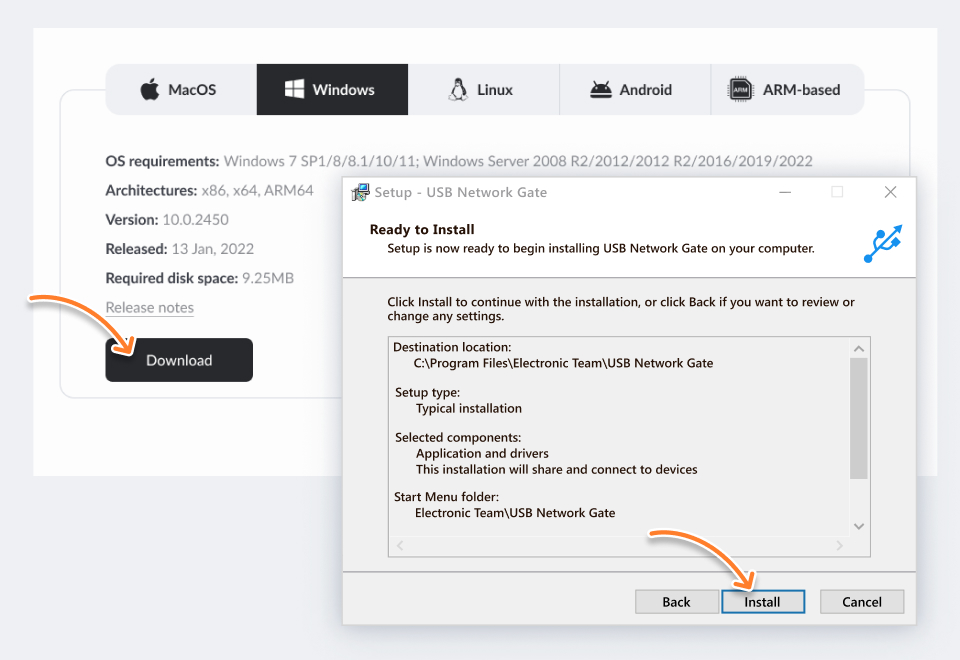
1. Download USB Network Gate on your server computer. Install the software on.
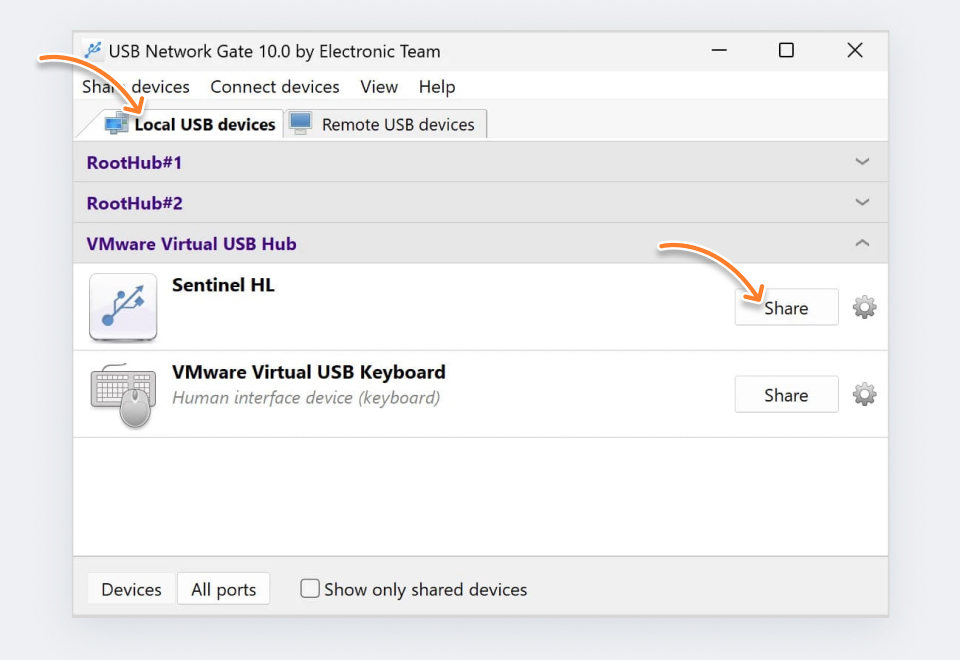
2. Launch the USB Network Gate. Choose the USB peripheral or device that you wish to share. Click on “Share”. Now, select a sharing method, such as the Internet or your local network.
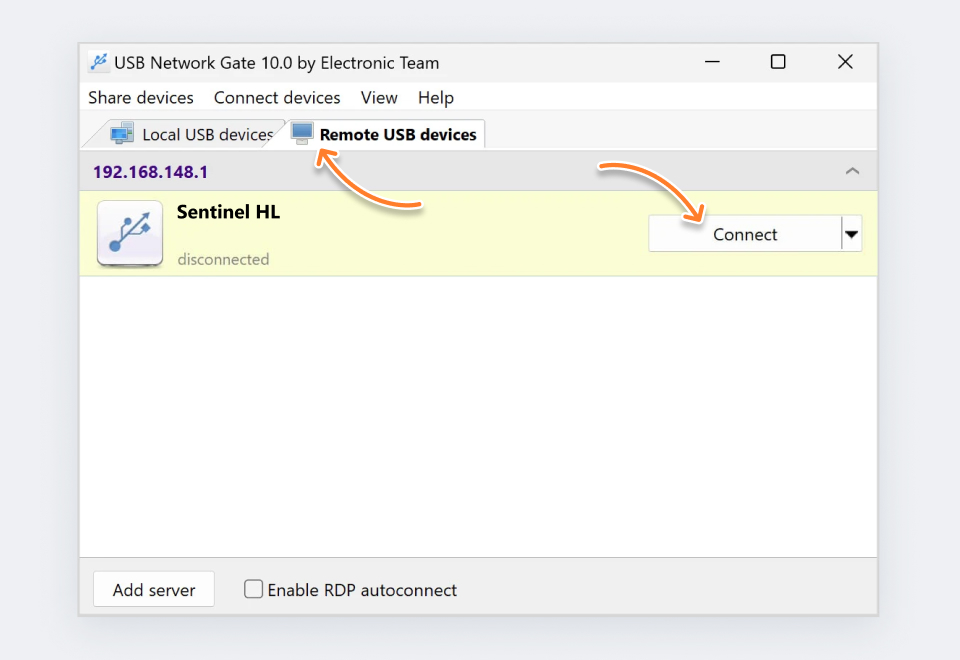
3. Install a USB Network Gate on the client computer. Now, use your server ID or name and connect to your shared devices.
Watch how to create a USB server.
Pros
- No matter the physical distance, you can enable remote access to USB devices seamlessly from any authorized device.
- Doesn't require you to connect devices physically to multiple computers.
- Encrypted connections ensure data privacy during remote access.
- The app is free for 1 device.
Cons
- To enable remote access, it requires a fully functional and a stable network connection.
Additional Abilities:
- Remote management: Lets you remotely control and manage shared devices from a client computer.
- Session management: You can manage multiple connections concurrently to the shared device.
- Customization: You can view, set up, and customize security settings and access permissions for a group of individuals or a single individual.
Applications:
- Remote workspaces: The software is ideal for remote workplaces like home offices, enabling remote access to work peripherals such as scanners, printers, etc.
- Shared labs and classrooms: Educational institutions can centrally access specialized equipment. Get your free software license.
- Cloud-based workflows: It enables remote access and management by integrating USB devices with cloud platforms.
Price: USB Network Gate is free for 1 USB device. Its paid licenses start from $159.95 for 10 devices.
USB Device Server: Top Hardware Solutions
Let’s dive deep into the detailed benefits, features, and applications of 3 best hardware-based USB server hardware:
- Digi AnywhereUSB Plus
- SEH’s utnserver Pro
- Silex DS-700
These server solutions offer many advantages suitable for different environments and can meet specific needs. They safeguard office settings in different industries.
In the below section, you will know how to choose the right USB device server based on your needs. This information is useful whether you want to enhance your operational efficiency, extend your USB device’s functionality across the network, or secure data transmission.
Digi AnywhereUSB Plus
Digi AnywhereUSB Plus is a USB server attached to your network and connects a USB device to a computer over an IP network. This solution allows you to remotely access and manage USB devices with greater scalability, security, and flexibility.
Key Features:
- Multi-port connectivity ( from 2-24 ports).
- Software upgrades to support Wi-Fi connectivity and LTE Cellular modules.
- Failover redundancy with rack mounting, ethernet connections, and dual power supplies.
Pros
- High scalability.
- Supports cellular and Wi-Fi connectivity.
- Ideal for industrial applications due to robust design.
Cons
- Expensive compared to other solutions.
- Beginners may find the set up complex.
Applications: Suitable for large-scale industries like healthcare and commercial settings requiring remote access to USB devices.
Price: The software’s pricing varies according to the features and plan, starting from $290 for the basic plan. It increases for plans with advanced features and more ports.
utnserver Pro by SEH
The utnserver Pro is a professional-grade USB device server designed to make USB devices network-able in a secure manner. It allows for the management and control of USB devices over the network.
Key Features:
- Supports multiple USB devices
- Point-to-point connection security
- Easy to configure and manage with SEH’s UTN (USB over IP server or network)
Pros
- Compatibility with a wide range of devices.
- Enhanced security functionalities.
- Dedicated management software.
Cons
- Pricing can be a bit higher for small-scale businesses.
- Complex to set up for non-technical users.
Applications: More suitable for organizations and businesses to securely share USB devices across a network, like in offices, educational institutions, and data centers.
Price: $268.99-434.99 plus delivery fees. Contact SEH for price clarification.
The Silex DS-700
The Silex DS-700 is a sophisticated USB server software that connects and shares multiple USB devices over a network. Due to its high reliability and performance, it’s suitable for industries and businesses.
Key Features:
- Supports high-speed USB 3.0 support to connect devices efficiently
- Compatible with various USB devices
- Advanced security features to enable secure data sharing on a network
Pros
- Utilizes USB 3.0 for faster data transfer rates.
- Supports a wide range of devices.
- Utilizes robust security protocols.
Cons
- Setup process can be lengthy and complex.
- A bit expensive.
Applications: Ideal for sectors, such as manufacturing, IT, and medical requiring secure data access and high-speed data transfer.
Price: Ranging from $170 to $210 plus shipping charges. The Silex DS-700’s pricing may vary like other dedicated hardware solutions. It’s best to reach out to The Silex team or a distributor to get pricing information in detail.
Conclusion
Turn your computer into a robust USB server using software-based and hardware-based USB server solutions. Hardware-based solutions come with dedicated functionality but involve certain limitations in terms of potential compatibility, physical size, and cost.
On the other hand, software-based USB server solutions are more convenient and versatile. You will get plenty of advantages with these software applications:
- Cost-efficiency: Software-based USB servers leverage your current hardware, saving you from investing on additional dedicated devices.
- Remote access: You can access USB devices virtually from anywhere if you have an internet connection. This promotes accessibility and collaboration.
- Ease of use: Software-based USB servers solutions have user-friendly interfaces. You will find it easier to set up these solutions and access them even if you are a non-technical user.
- Platform compatibility: Many USB server software solutions are compatible with various operating systems, increasing flexibility in your environment.
Although hardware-based USB server solutions may cater to specific needs, software-based USB server solutions come with a compelling combination of best-in-class features, ease of use, affordability, and flexibility.
So, unlock your USB device’s true potential by choosing a suitable USB server software solution taking into account your specific needs and budget. Experience the freedom and convenience of remote access in this connected world.