



WebCam Monitor
Another specialized Windows application - WebCam Monitor.
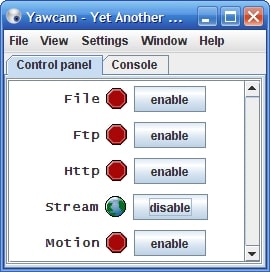
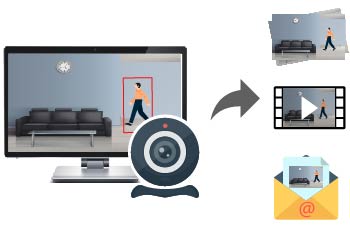
WebCam Monitor enables you to access your webcam remotely so you can monitor your home or office from any location. The remote webcam software provides automated surveillance by detecting noise or motion. These environmental events trigger alerts that can be configured to sound an alarm, make an audio and video recording of the incident, and notify users via text message or e-mail. The software can also be used to initiate recordings at set time intervals to document events within view of the webcam.
How to use WebCam Monitor?
All you need to do to use WebCam Monitor is to connect a webcam to your Windows machine. You can implement a surveillance system in minutes using the intuitive configuration wizard. Choose to have the system active 24 hours a day or customize its hours of operation. The scheduler function enables you to start and stop the application using any timetable you choose.
WebCam Monitor enables you to monitor your webcam from any place on the globe. It’s a great solution when you need to view a webcam remotely. Just connect a webcam to your PC and you can keep an eye on things no matter where you are located.
There are three different methods of using WebCam Monitor. Choose the one that works best for your situation.
- Watch live broadcasts from the webcam
You can obtain a continuous live stream from your webcam with WebCam Monitor. With a robust Internet connection and adequate bandwidth, you can implement IP camera remote access and monitor all the action your webcam captures from a live feed.
- Receive photos webcam of activity via emails
You can configure email notifications to include an attached photo either when motion is detected or at customized and regular intervals.
- View uploaded video recordings and photos on your web site
Retain videos and photos generated by your webcam by storing them on an FTP server. You can have data sent at predefined intervals or when the software detects motion. Using a server to store the webcam’s images offers extra protection for the data if the computer or webcam is stolen. It also puts all of your recordings in one place, making it easy to analyze them if necessary.
Supported Platforms: Microsoft Windows 10 / 8 / 7 / Vista / XP / 2012 / 2008
Price: $69.95 USD