RS-232 Over IP Solutions: Device Servers and Software Alternative

Most users enable RS-232 over IP using dedicated hardware device servers. These work but are best for static environments. 

Managing and scaling hardware-based RS-232 servers can become difficult when deployments become dynamic. This is because the solution requires consistent configuration changes, rapid scaling, and different remote users.

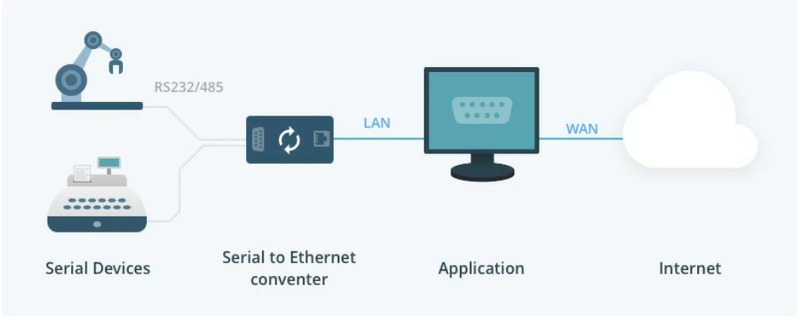
Serial to Ethernet converter

The hardware-based RS-232 device server is a much safer and more predictable option when you require continuous operation and independence from a host computer. On the other hand, a software-based RS-232 device server offers a practical alternative that reduces cost. It is suitable for rapid deployment, ease of management, and flexibility. 

In this article, we discuss primarily hardware-based RS-232 over IP device servers and will explain when you can use software-based RS-232 servers as a practical alternative. 

RS-232 Over IP Hardware Device Servers

RS-232 over IP hardware solutions are commonly known as Ethernet serial servers, serial device servers, and RS-232 to Ethernet adapters, providing reliable network connectivity. These devices link directly to a serial interface and make it accessible over the network using TCP/IP or UDP protocols.

Operational Requirement

• Reliable continuous performance
• A dedicated power input or Power over Ethernet (PoE)
• No heavy operating system requirements (to ease deployment)

Commonly Used Hardware Device Servers

Below are some of the most commonly used RS-232 over Ethernet hardware device servers, ranging from budget-friendly industrial models to enterprise-grade solutions with advanced security and management features.

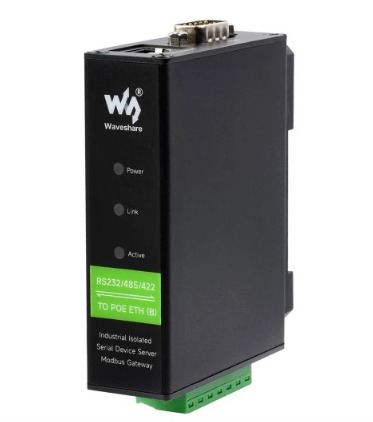
Waveshare Electronics Rail-mount Serial Server (RS-232 to RJ-45)

Waveshare Electronics Rail-mount Serial Server comes in various versions, including models with Power over Ethernet (PoE) support. These devices support MQTT and Modbus, making them perfect for industrial environments.

Rail-Mount Serial Server

These devices come with:

• Web-based configuration interface
• 1 x RS-232 port, 1 x RJ-45 Ethernet port with optional PoE support
• Modbus and MQTT protocols for easy integration
• TCP server and client modes, along with UDP multicast for flexible communication
• Wide range 9-24V DC power input with secure screw terminal connection
• Price of $26.99 for the PoE-enabled model

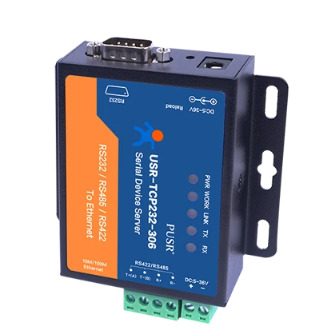
PUSR USR-TCP232-306

In the PUSR USR-TCP232-306 device server, you’ll get both default ports and screw terminals. This will make the server flexible for multiple wiring scenarios. You’ll also find Windows software in this device server for configuration. The Windows software also helps create virtual serial ports on the client side. 

PUSR USR-TCP232-306

These devices come with:

• Easy configuration using dedicated Windows software
• RS-232 and RS-422/485 serial ports with an RJ-45 Ethernet interface
• Modbus protocols 
• TCP server and client modes, along with UDP communication
• A DC power input of 5-36V 
• Priced at $38.85

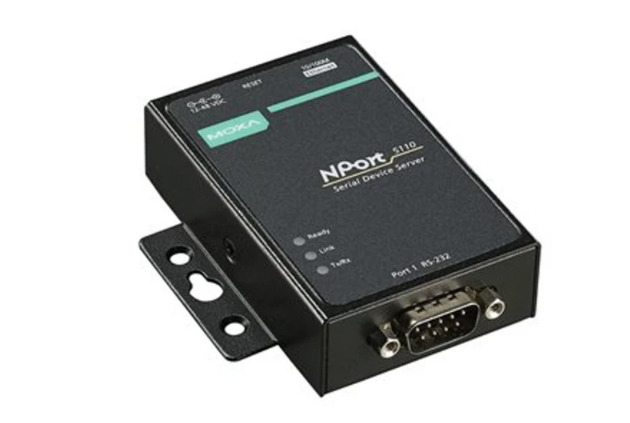
MOXA NPort 5100

MOXA NPort 5100 devices are popular among legacy system integration and industrial automation. These devices come with greater compatibility with several operating systems and extensive management functionalities.

MOXA NPort 5100

These devices come with:

• Flexible configuration using web interface, Windows utilities, and Telnet
• 1 x RS-232 port and 1 x RJ-45 Ethernet port
• SNMP supported protocol
• TCP server and client modes, along with UDP communication
• Wide range of 12-48V DC power input 
• Priced at $141.78

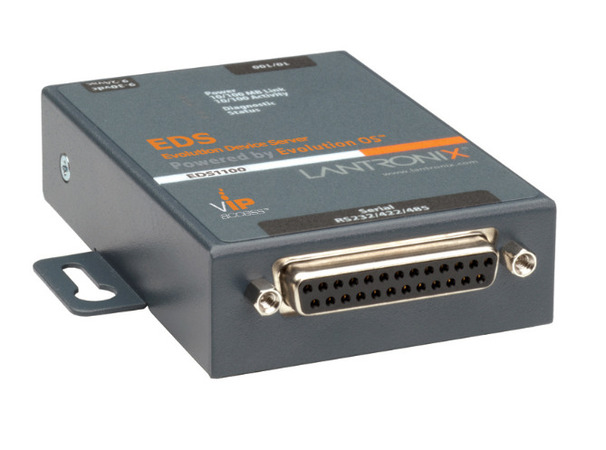
Lantronix EDS1100

Lantronix is a leader in secure edge computing. Lantronix EDS1100 is an enterprise-grade hybrid Ethernet terminal/device server designed for users who prioritize data security and remote management. It features robust encryption, making it suitable for medical, financial, and high-security government applications.

Lantronix EDS1100

These devices come with:

• Web interface (HTTPS), CLI (SSH), SNMP
• 1× RS-232, 1× RJ-45
• AES encryption, SSH, SSL/TLS, SNMP v3
• TCP server/client, UDP, Virtual COM
• 9–30V DC
• Price: $195.00

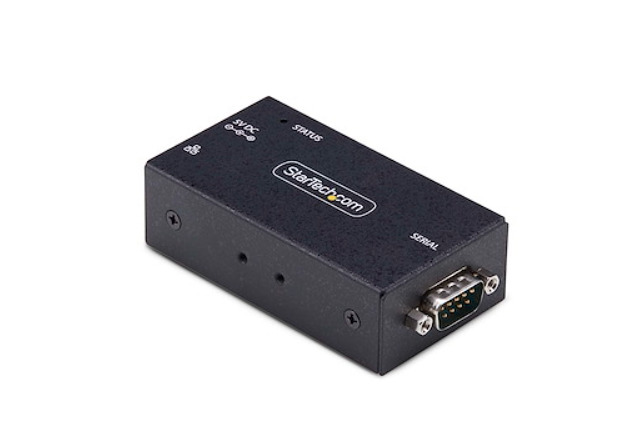
StarTech RS232 Over IP Connector

StarTech’s RS232 over IP connector facilitates seamless integration of RS232 serial devices with Ethernet networks. It has a compact design and Web-based configuration. Users confirm the device’s advanced security features. The Startech RS232 converter is suitable for industrial, commercial, and institutional applications.

StarTech RS232 Over IP Connector

These devices come with:

• Positive experiences were reported by users regarding ease of use and reliability.
• Web interface, Windows management utility
• 1× RS-232 (DB9), 1× RJ-45
• Telnet, HTTP, ICMP, DHCP
• TCP Server/Client, UDP, Pair Connection
• 12V DC (Power adapter included)
• Price: $171.16

Challenges with Hardware Device Servers

Hardware-based RS-232 serial servers are popular among many industries due to their reliable connectivity. But they also present practical limitations that organizations should consider when planning deployments. 

Some limitations are as follows:

• Requires a higher initial investment than software-based options
• Scalability is constrained, as each serial port supports only a single device
• Available firmware features can vary based on the vendor
• On-site physical installation is required

These limitations often make a software-based RS-232 over IP solution a preferred alternative in more flexible environments. 

Software-Based RS-232 Over IP Alternative

As discussed, hardware-based device servers are the conventional approach for an RS-232 over IP solution. 

Serial to Ethernet Connector is a flexible software solution that shares RS-232 and other serial ports across IP networks. In this case, the host computer serves as a serial server that enables remote access to virtual and physical COM ports. 

The application supports Windows (32-bit and 64-bit) and Linux, including a Linux version for ARM-based devices. It also provides flexible setup options with reusable connection presets. 

How to Access Remote RS232 over IP/TCP via Serial to Ethernet Connector

1. Download the application.

2. Install it on all computers in your network (or virtual machines with apps that need access to serial ports).

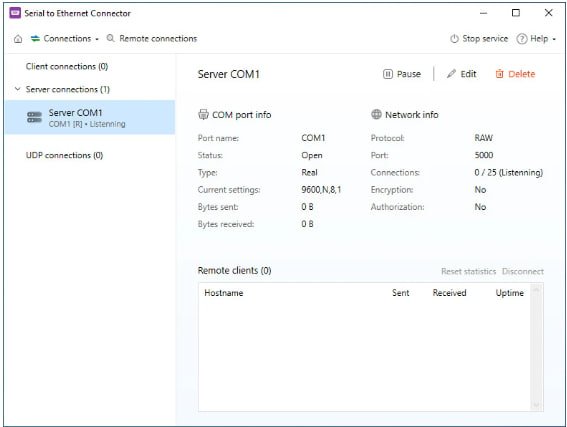
3. Select “Create Server Connection” option in the app’s main window.
Select “Create Server Connection”

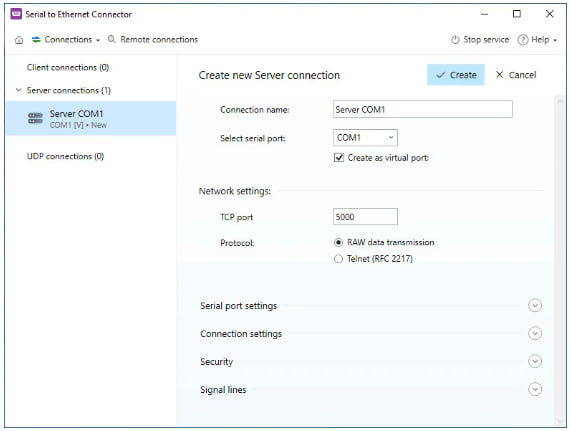
4. Configure connection parameters.

Configure connection parameters

5. Create a client connection on a remote computer.
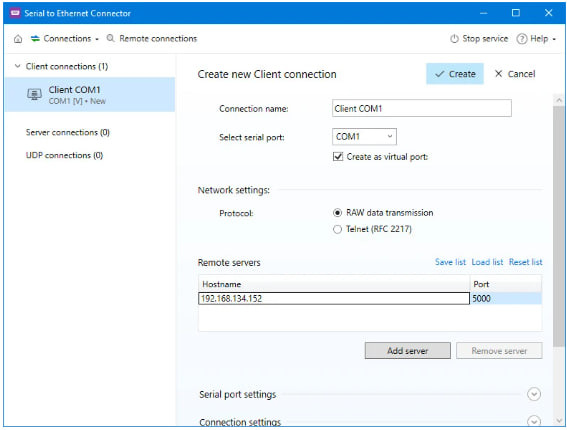
Create a client connection

And now, you are all set. You can start using your RS-232 serial over Ethernet software remotely over the network instantly. The application supports both Windows and Linux operating systems. 

Note: On Linux-based machines, the application runs via a command-line interface.

Potential Drawbacks of Software Solution

Although a software-based RS-232 over IP solution is flexible, it is important to be aware of its limitations before deployment:

• RS-232 software solution needs a continuously running host computer for functionality
• Requires compatibility with the host operating system
• May not perform as expected in demanding industrial environments.

Final Thoughts

The decision between hardware and software solutions requires evaluation of operational needs and deployment requirements, and maintenance needs for the future. Organizations can develop an RS-232 over IP architecture that achieves stability, scalability, and cost efficiency by understanding the strengths and limitations of both approaches.

Serial to Ethernet Connector provides multiple usage options which extend from development work through testing processes to actual production implementation. The system supports physical and virtual COM ports while working with different operating systems and providing quick system changes, which makes it suitable for environments that need dependable operation and flexible capacity.