The availability of COM ports provides enhanced functionality in virtual machine environments such as VirtualBox, Hyper-V, and VMware. Serial port hardware can help with server consolidation, data recovery, and improved productivity.
This guide illustrates how you can manage serial ports in various types of virtual environments. The options and steps discussed will help you implement efficient and effective communication between serial devices and virtual machines. VM users can enjoy improved productivity and superior utilization of peripheral devices.
How Serial Port Communication Works Between Host and Guest Virtual Machines
Guest Virtual Machines can benefit from communication with devices or host applications via serial ports in many usage scenarios. USB to COM devices can be attached directly to a virtual machine. Native COM devices are only accessible to a Virtual Machine if it has been connected to the host computer.
VMs use bridges to forward serial port data to guest machines. When a VM is connected to a particular COM port, it becomes unavailable to the host machine. Establishing a pair of virtual serial ports enables data transfers between host and guest applications.
Issues and Limitations of Serial Ports in Virtual Machines
Whether you’re using VMware, VirtualBox, or Hyper-V, serial port passthrough can present challenges due to configuration errors or inherent limitations of virtualization.
Common issues include: COM port conflicts, incorrect port mapping, limited native passthrough support, performance and latency problems, USB-to-serial adapter incompatibility, driver issues, and poor scalability when multiple connections are required. Understanding these common issues is essential for effective serial port troubleshooting in virtual machines.
Can these issues be solved?
Yes. With reliable and well-designed virtualization software, most serial port issues can be effectively resolved. High-quality solutions such as Serial to Ethernet Connector offer better compatibility, simplified configuration, comprehensive documentation, and dedicated support, ensuring a more stable and seamless VM experience.
Software to Establish Serial Communication in Virtual Environments
Serial to Ethernet Connector provides users with a streamlined and efficient method of accessing serial devices from virtual machines. The software makes it easy to connect to COM ports in virtual environments like VMware, VirtualBox, and Hyper-V. The following simple steps demonstrate how to set up serial port sharing on a virtual machine.
Step-by-step Guide:
1. Download and install Serial to Ethernet Connector on the physical host computer that will share a COM port.
2. Start the application and navigate to the Server connection tab.
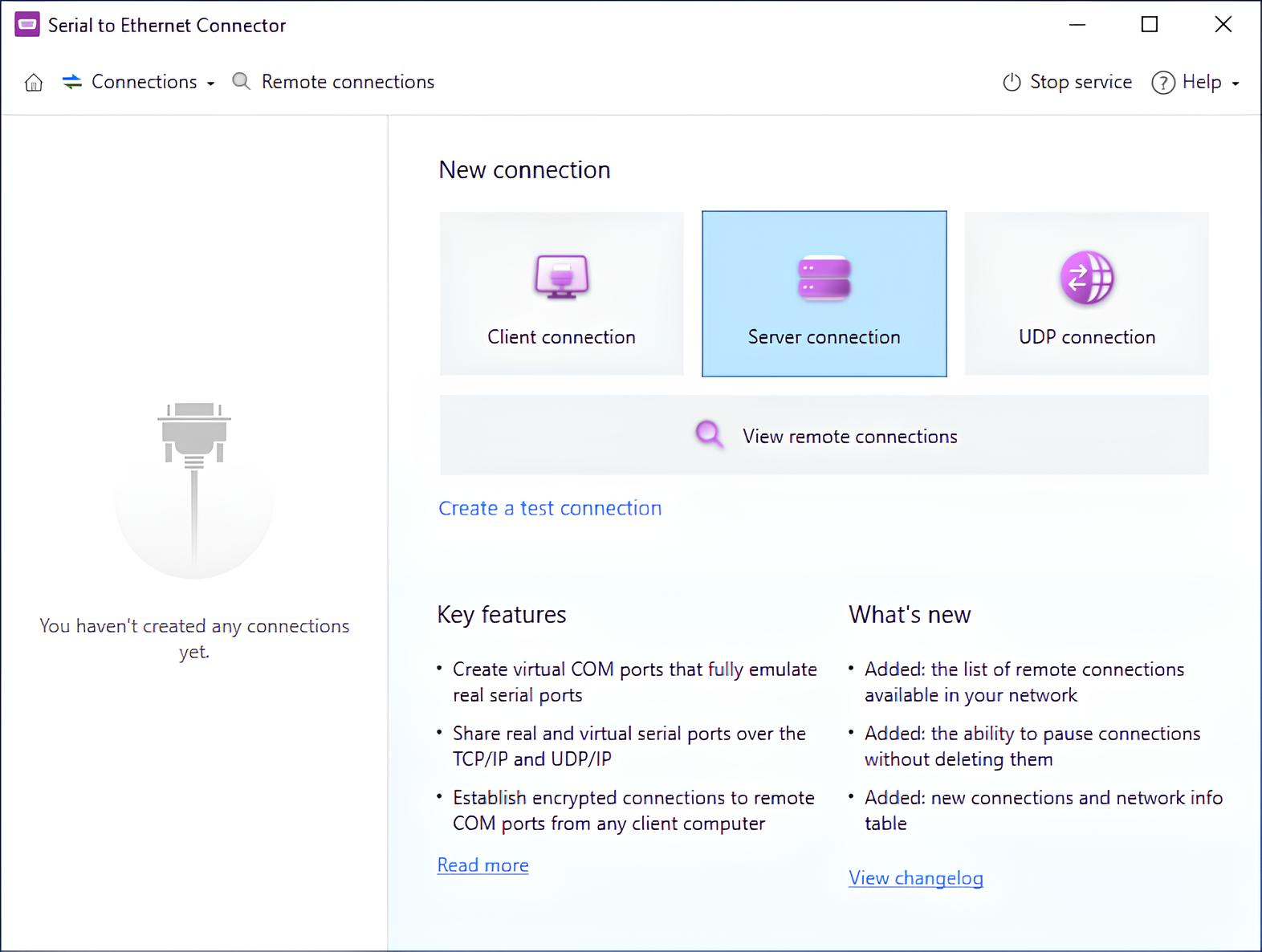
3. Define the COM port on the host machine and the TCP port that will monitor communication.
4. Create a server connection to connect the physical COM port to the virtual machine.
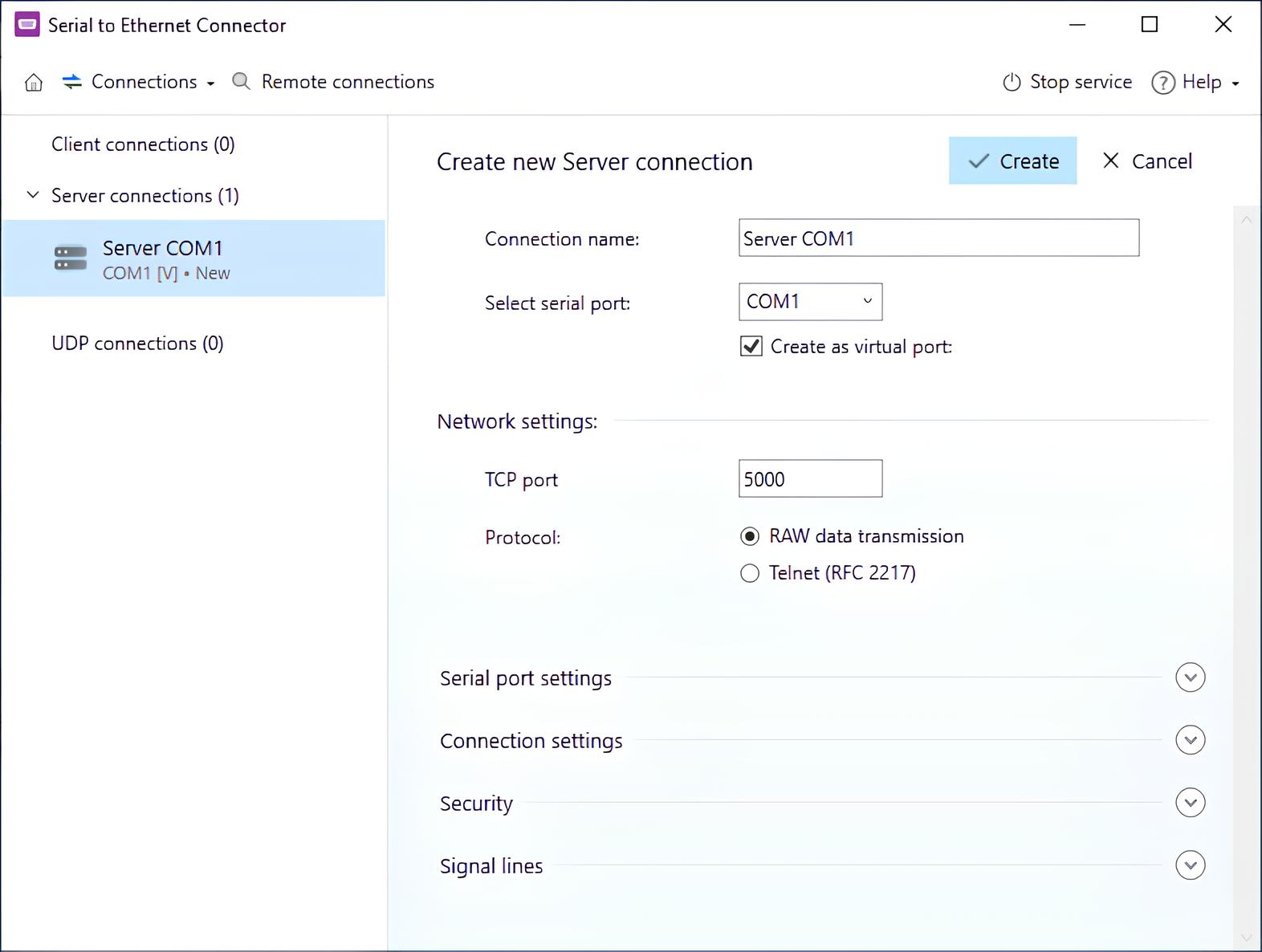
5. Configure the TCP port and the host computer’s IP address on the guest machine.
6. Select a name for the virtual machine’s serial port.
7. Create the virtual serial port in the app’s interface.
Serial Port Implementation in VirtualBox, Hyper-V, and VMware
Serial ports can be accessed in the following virtual environments.
- VirtualBox – When a VirtualBox serial port is enabled, the guest OS obtains access to a UART device for data transmission. Specific configuration details depend on the host OS in use.
- Hyper-V – The Hyper-V Manager does not display serial ports by default. COM port connectivity can be established with additional configuration, allowing VMs to implement serial port passthrough functionality.
- VMware – VMware VMs can create up to four virtual serial ports. Each port facilitates communication with physical serial ports on the host machine and can output data to named pipes or files.
Serial Port Bridging and Connection Modes in Virtual Machines
Virtual machines include a setting that allows users to create a bridge between serial ports on the host and guest systems, eliminating the need to create an additional COM port for connectivity.
On Windows hosts, legacy naming applies to COM ports numbered from COM1 to COM9. Ports with higher numbers require full device naming, for example: \\.\COM10.
Serial port bridging supports multiple connection modes, making it suitable for a wide range of applications. Common use cases include controlling physical serial devices from a guest OS and exchanging data between physical or virtual machines for COM port testing and troubleshooting.
Available connection modes include:
- File
- Pipe
- TCP
Conclusion
Working with serial ports in virtual machines can be challenging due to platform-specific limitations, complex configuration steps, and compatibility issues. Although VMware, VirtualBox, and Hyper-V provide native mechanisms for serial port access, these approaches are often difficult to manage and may not scale well in real-world environments.
Serial to Ethernet Connector simplifies serial port connectivity by providing a universal and flexible solution that works across virtual platforms. By virtualizing COM ports over a network connection it removes the dependency on direct hardware passthrough and enables reliable communication between hosts, guests, and serial devices. This approach reduces setup time, improves stability, and allows virtual machines to interact with serial hardware as easily as if it were locally connected.
With Serial to Ethernet Connector, organizations can implement serial communication in virtual environments more efficiently, ensuring consistent performance and easier management as their infrastructure grows.